
Better Prompts for Better Results: How to Get More From AI
The quality of what you get from any AI tool depends almost entirely on how well you ask for it. This guide teaches you how to write better prompts so you stop getting generic answers and start getting results that are actually worth using.
Most people who use ChatGPT, Claude, or any other AI tool eventually hit the same wall. They type something in, get a response that feels generic or off-target, and walk away thinking the tool is not as useful as everyone said it would be.
The tool is not the problem. The prompt is.
A prompt is the instruction you give an AI tool before it responds. It could be a question, a command, a request, or a detailed brief. Whatever you type into that input box is your prompt, and how you write it determines almost everything about what comes back.
This guide will show you exactly how to write better prompts so you get more useful, specific, and impressive results from any AI tool you use. Whether you are a student trying to write better essays, a developer looking for faster debugging help, a content creator who wants to stop sounding robotic, or an entrepreneur trying to save time on daily tasks, what you learn here will change how you use AI immediately.
What Is a Prompt and Why Does It Matter So Much
A prompt is your side of the conversation with an AI tool. It is the text you type before the AI responds. Every word you include, and every word you leave out, influences the response you receive.
Think of it this way. If you walk up to a brilliant expert and say "tell me about marketing," you will get a broad, surface-level answer. But if you say "I run a small clothing business targeting university students in Lagos. What three low-cost marketing strategies would work best for me right now?" you will get something specific, relevant, and actually useful.
AI works exactly the same way. It responds to what you give it. The more context, direction, and detail you provide, the more targeted the response becomes. This is why two people using the same AI tool on the same topic can get completely different results depending on how they each phrase their request.
Prompt quality is the single biggest factor separating people who find AI incredibly useful from people who find it disappointing.
Why Most People Write Weak Prompts
Nobody teaches you how to write a good prompt. You sign up for an AI tool, see a text box, and type whatever comes to mind naturally. That impulse usually produces a short, vague question without any context or direction.
It is not your fault. It is just not something most people have had to think about before. We are used to searching on Google with short keywords. We are used to asking friends quick questions. Both of those habits carry over into how we talk to AI, and both of them produce weak prompts.
Short and vague prompts tell the AI almost nothing about who you are, what you actually need, why you need it, or what a useful response looks like to you. The AI fills in those gaps with assumptions, and those assumptions are almost always wrong for your specific situation.
How a Good Prompt Is Structured
The best prompts share a consistent structure regardless of what you are asking for. Once you understand the structure you can apply it to almost any task.
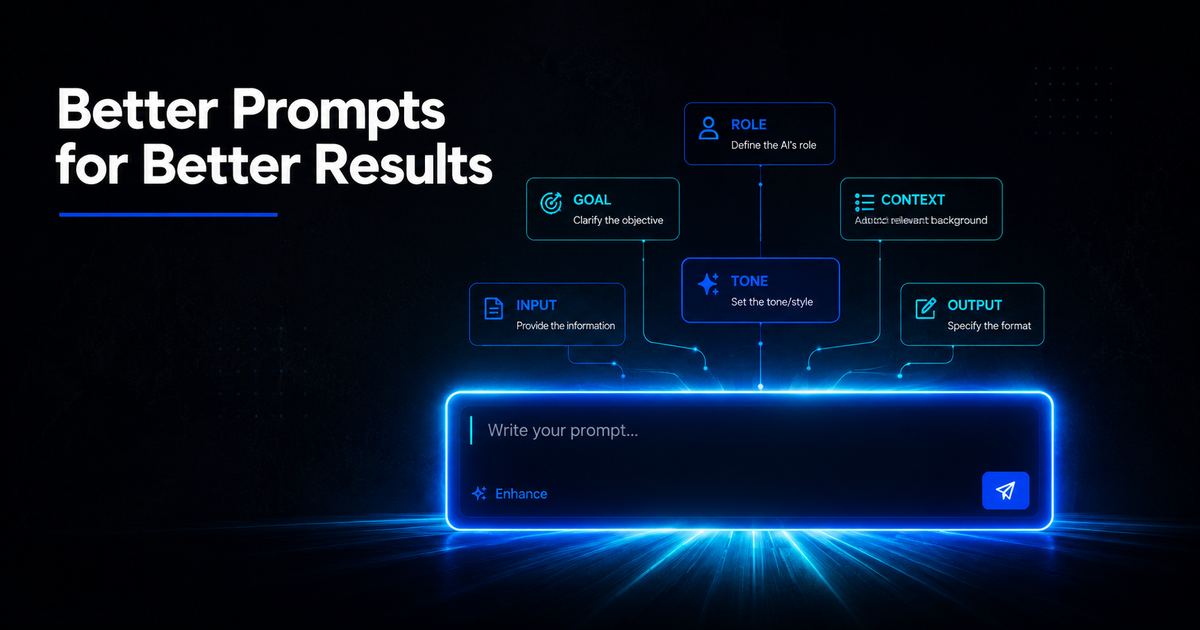
A strong prompt has five components. You do not always need all five but the more you include the better your result.
Role
Tell the AI what kind of expert to act as. This sets the tone, depth, and perspective of the response immediately.
Instead of just asking a question, start with something like "You are a senior Python developer" or "Act as an experienced content strategist for small businesses" or "You are a university professor specialising in economics."
When you assign a role, the AI responds from that perspective rather than giving a generic answer from no particular viewpoint. The difference in quality is immediate and significant.
Context
Tell the AI about your specific situation. Who are you? What are you working on? Why do you need this? What constraints apply?
Without context, the AI makes assumptions. With context, it tailors everything to your actual circumstances. A student writing a history essay needs a very different tone and structure from a journalist writing a news article, even if both are asking about the same topic.
Task
Be specific about what you want the AI to actually produce. Not just "help me with this" but "write a 500-word introduction that argues for this position" or "give me a list of ten ideas with a brief explanation for each."
The more specific your task description, the more focused the output becomes. Vague tasks produce vague results every single time.
Format
Tell the AI how you want the response structured. Should it be a numbered list? Short paragraphs? A table? A bullet point summary followed by a detailed explanation? A script with scene labels?
AI tools are good at following format instructions. If you want the output in a particular structure, say so explicitly and you will almost always get exactly that.
Constraints
Add any limits or specific requirements. Maximum word count, a particular tone, things to avoid, a specific audience to write for, a deadline to reference, or any other restriction that shapes what a useful response looks like for your purpose.
Constraints help the AI eliminate a wide range of possible responses and focus on the narrow range that actually matches your needs.
Benefits of Writing Better Prompts
The most immediate benefit is time saved. When your prompt is clear and detailed, the first response from the AI is usually much closer to what you need. You spend less time editing, less time asking follow-up questions, and less time starting over from scratch.
Better prompts also produce better quality output. A well-structured prompt that includes role, context, task, format, and constraints will consistently outperform a vague one-line question on the same topic regardless of which AI tool you are using.
For students, better prompts mean getting feedback, explanations, and study materials that actually match your curriculum and level. For developers, they mean getting code solutions that fit your specific language, framework, and project requirements. For creators, they mean getting content that sounds like you rather than sounding like every other AI-generated piece on the internet.
Limitations to Know Before You Start
Better prompts improve your results significantly but they do not make AI tools perfect. There are things even the best-written prompt cannot fix.
AI tools can still produce factually incorrect information, particularly on recent events, niche topics, or highly technical subjects. A well-written prompt will get you better structure and more relevant content but it will not guarantee accuracy on facts you cannot verify yourself.
Very long or complex prompts sometimes confuse AI tools, especially when you stack too many different tasks into a single request. If you need several different things, it often works better to break them into separate prompts and handle them one at a time.
AI tools also do not know things that happened after their training data was collected. No matter how good your prompt is, asking an AI tool for yesterday's news will not produce accurate results. Use search-connected tools like Perplexity for anything that requires current information.
Best Use Cases for Better Prompting
Students benefit enormously from learning to write good prompts. Getting feedback on essays, having complex topics explained in simple terms, generating practice questions before exams, and getting structured outlines for research papers all become significantly more useful when the prompts behind them are well-written. Check Free AI Tools for Students in 2026 to get started with important AI tools as a student.
Developers save hours every week by writing prompts that include the specific programming language, the exact error message they are seeing, the version of the framework they are using, and the expected output they are aiming for. Vague code help produces vague code fixes. Specific prompts produce specific, working solutions.
Content creators who learn to write prompts that specify their tone, their audience, their platform, and their goal start getting AI output that feels like their voice rather than someone else's. The difference between "write me a caption" and "write an Instagram caption for a Nigerian tech entrepreneur with a conversational and direct tone, targeting other young professionals, ending with a question about their experience" is the difference between generic and genuinely useful.
Entrepreneurs use better prompts to get business plans, email drafts, market research summaries, customer response templates, and marketing copy that are actually relevant to their specific business rather than placeholder examples that need complete rewrites.
Practical Tips You Can Apply Right Now
Start every prompt with a role before anything else. Even just "Act as a [relevant expert]" before your actual request will noticeably improve your results. It takes five extra seconds and the difference is consistent.
Read your prompt out loud before submitting it. If it sounds vague or incomplete when you say it out loud, it will produce a vague and incomplete response. Add what is missing before you hit send.
Use the phrase "for someone who" when writing prompts. Specifying who the output is for immediately adds the kind of audience context that makes AI responses more targeted. "Explain machine learning for someone who has never studied programming" produces a very different result from "explain machine learning" on its own.
Add "do not" instructions for things you want to avoid. If you do not want bullet points, say so. If you want the response to avoid jargon, say that. If you do not want it to start with a disclaimer, include that instruction. AI tools follow negative instructions just as reliably as positive ones.
Iterate instead of starting over. If your first response is not quite right, do not delete everything and begin again. Instead add a follow-up instruction. "Make the tone more conversational" or "expand the third section with two practical examples" or "shorten this to under 300 words" will usually get you closer to what you want faster than rewriting the original prompt entirely.
Check out the 300+ ChatGPT prompts for students, developers, content creators and others if you want already-made prompts that you can just copy and paste for good results.
Common Mistakes That Produce Bad Results
Asking too many things at once is one of the most consistent ways to get a messy, unfocused response. If you want a blog post outline, five caption ideas, a product description, and an email draft, do those as four separate prompts rather than bundling them into one.
Skipping context is the mistake that costs people the most time. Every prompt that does not explain who you are, what you are working on, and why you need help forces the AI to guess. It will guess wrong most of the time. Thirty seconds spent adding context saves minutes of editing and revision afterward.
Accepting the first response without iteration is a habit that keeps people stuck at average results. The first response from an AI tool is a starting point, not a finished product. Ask it to improve, adjust, expand, or focus, and you will almost always end up with something significantly better than what you had after one attempt.
Forgetting to specify the audience is a common oversight that makes otherwise good prompts produce content that feels off-target. The same topic needs to be handled completely differently for a beginner versus an expert, for a teenager versus a working professional, for someone in Nigeria versus someone in the United States.
Where Prompting Is Heading
The skill of writing good prompts is becoming more valuable as AI tools become more capable. The tools are getting better at understanding nuanced language, longer context, and complex multi-step instructions. That means the ceiling of what a well-written prompt can produce keeps rising over time.
Voice-based prompting is growing rapidly. As AI tools integrate with voice interfaces, the same principles of role, context, task, format, and constraints apply but through spoken language rather than typed text. Learning to think in structured prompts now prepares you for that shift.
There is also a growing market for people who specialise in writing prompts for specific industries and use cases. Companies are paying for well-crafted prompt libraries because the difference between average and excellent AI output scales directly with prompt quality when you are using AI across an entire team or organisation.
Final Thoughts
Getting better results from AI is not about finding a more expensive tool or waiting for the next model upgrade. It is about learning to communicate your needs clearly, specifically, and with enough context that the AI has everything it needs to respond usefully.
The five components of a strong prompt, role, context, task, format, and constraints, are not complicated. They are just specific. Once you start including them consistently you will notice the difference in your first response on almost every single request you make.
Start with one prompt today. Take something you regularly ask an AI tool to help with and rewrite the prompt using the structure in this guide. Compare the result with what you used to get and you will have all the evidence you need to change how you use AI permanently.
FREQUENTLY ASKED QUESTIONS
What is the difference between a good prompt and a bad prompt?
A good prompt includes context about who you are, a clear task, a defined format, and specific constraints. A bad prompt is usually short and vague, leaving the AI to fill in too many gaps with assumptions. The more detail you give, the more useful the response you receive.
How long should a prompt be?
There is no fixed length. A prompt should be as long as it needs to be to communicate your role, context, task, format, and any constraints clearly. Some good prompts are two sentences. Some are ten sentences. Length matters less than completeness and clarity.
Do better prompts work on all AI tools?
Yes. The principles of clear role assignment, specific context, defined tasks, format instructions, and constraints improve results on ChatGPT, Claude, Grok, Gemini, and any other AI tool that accepts text input. The structure is not tool-specific.
Can I save good prompts and reuse them?
Absolutely and you should. If you find a prompt that consistently gives you excellent results for a particular task, save it somewhere accessible and use it every time you need that kind of output. Building a personal library of tested prompts is one of the most practical ways to save time with AI tools.
Why does the same prompt sometimes give different results?
AI tools have a degree of randomness built into how they generate responses. Even an identical prompt can produce slightly different output each time. This is normal. If you need consistent results, most tools have a setting called temperature that controls randomness. Setting it lower produces more consistent output.
Is prompt writing a skill worth investing time in?
Yes, particularly now. The more capable AI tools become the more value there is in knowing how to direct them effectively. People who learn to write good prompts today are building a skill that will remain relevant and valuable as AI tools continue to develop and become more central to how most professional work gets done.
Comments (0)
Sign in to post a comment.
- Be the first to comment.