NotebookLM vs ChatGPT: Which One Is Better for Learning and Research?
NotebookLM and ChatGPT are two of the most popular AI tools for students, researchers, and professionals. While both can answer questions and explain ideas, they work in very different ways. This guide compares their features, strengths, and limitations to help you choose the right tool for learning and research.
Finding information has never been easier, but finding information you can trust is still a challenge. Students, researchers, developers, and professionals now have access to powerful AI tools that can summarize documents, answer questions, explain difficult topics, and even help organize research. Two names appear again and again in these conversations: NotebookLM and ChatGPT.
Although they may seem similar at first, they were built for different purposes. One focuses on helping you understand information from your own documents, while the other acts as a flexible assistant that can answer questions on almost any topic. Knowing the difference can save you time, improve the quality of your work, and help you avoid common mistakes.
In this guide, you will learn how NotebookLM and ChatGPT work, where each tool performs best, and which one is the better choice for studying, research, writing, and everyday learning. Whether you are preparing for an exam, writing a report, or exploring a new subject, this comparison will help you make the right choice.
What Is NotebookLM?
NotebookLM is Google's AI powered research and note taking assistant. Instead of answering questions from general knowledge alone, it works with documents that you upload yourself.
You can add files such as PDFs, Google Docs, lecture notes, reports, or presentations. NotebookLM reads these materials and uses them as the main source when answering your questions.
For example, imagine your lecturer gives you a 120 page textbook chapter. Instead of reading every page before finding the answer to one question, you can upload the document to NotebookLM and ask questions directly about its contents. The responses are based on the information inside your files, making them more relevant to your work.
NotebookLM also provides citations, making it easier to trace answers back to the original source.
What Is ChatGPT?
ChatGPT is an AI assistant developed by OpenAI. Unlike NotebookLM, it is designed to help with a wide variety of tasks beyond document analysis.
You can use ChatGPT to:
Learn new topics
Explain difficult concepts
Generate ideas
Write emails
Create reports
Solve programming problems
Practice interview questions
Summarize information
Brainstorm projects
Recent versions of ChatGPT can also work with uploaded files, images, and documents. However, its biggest strength is its ability to handle almost any type of conversation, not just information from a single source.
Because of this flexibility, many people use ChatGPT as an everyday learning companion.
Why This Comparison Matters
Choosing the wrong tool can make studying harder than it needs to be.
Many students assume every AI assistant works the same way. They upload research papers into ChatGPT and expect perfect citations. Others ask NotebookLM to help brainstorm creative ideas, even though it was mainly designed to work with uploaded materials.
Understanding what each tool does best helps you:
Save time while studying.
Get more accurate answers.
Reduce research mistakes.
Stay organized.
Improve the quality of assignments and reports.
Instead of replacing one another, NotebookLM and ChatGPT often work best together.
How NotebookLM Works
NotebookLM starts with your own sources.
After creating a notebook, you upload documents that are relevant to your project. These may include lecture slides, textbooks, research papers, company reports, meeting notes, or personal documents.
The AI reads these materials and builds its understanding from them. When you ask a question, it searches your uploaded content before generating an answer.
For example, if you upload three research papers about climate change and ask:
"What are the main causes of rising sea levels according to these papers?"
NotebookLM produces a response based only on those documents. It also points you to the sections where the information came from.
This makes it especially useful when accuracy is important.
How ChatGPT Works
ChatGPT works differently.
Instead of relying only on uploaded documents, it combines its trained knowledge with your prompts and any files you provide. This allows it to answer questions across many different subjects.
For example, you can ask:
"Explain quantum computing like I'm 15 years old."
Within seconds, ChatGPT provides a simple explanation using examples that are easy to understand.
You can continue asking follow up questions until the topic becomes clear.
This conversational style makes ChatGPT feel like a personal tutor who is always available.
Writing a cover letter, coming up with product name ideas, breaking down a hard topic into simple words, or drafting a week of social posts are all strong uses. If you use ChatGPT often, our ChatGPT productivity hacks that actually stick can help you build a simple system for getting more done.
NotebookLM vs ChatGPT for Learning
Both tools help people learn, but they solve different problems.
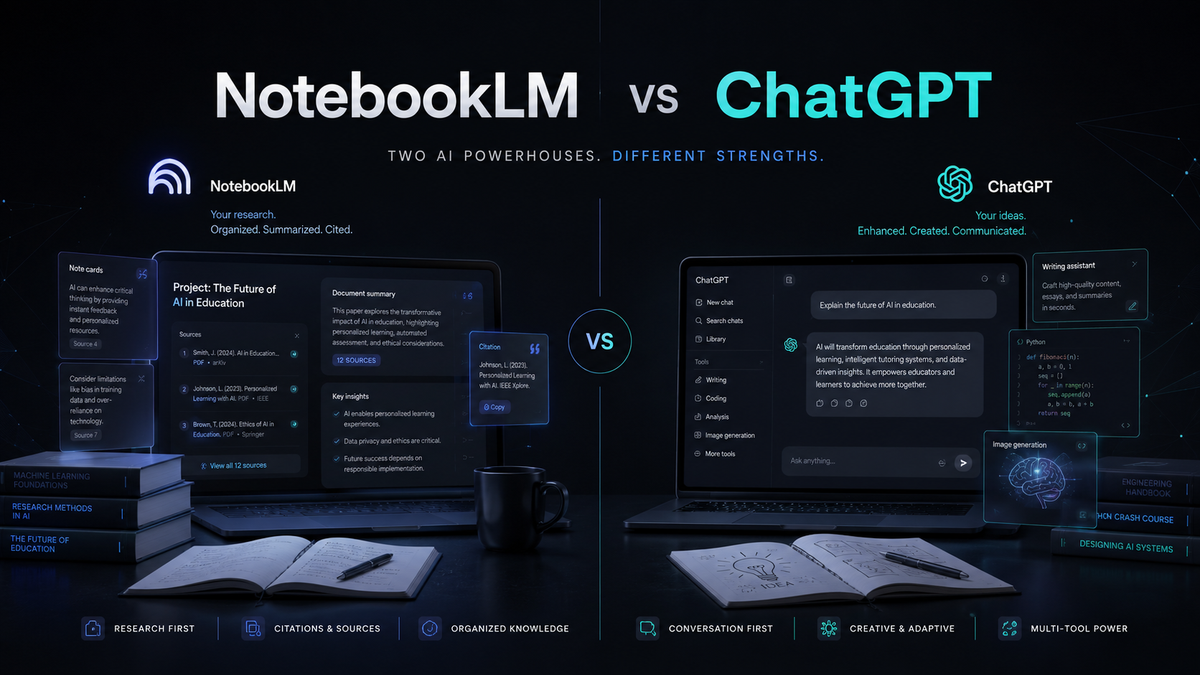
NotebookLM is strongest when your learning depends on specific documents. It keeps your notes, textbooks, and research organized while answering questions directly from those sources.
ChatGPT is better when you want to explore a new idea, simplify complex concepts, practice solving problems, or receive explanations in different ways.
Think of NotebookLM as your research assistant and ChatGPT as your personal tutor.
A university student writing a dissertation may spend hours inside NotebookLM reviewing academic papers. The same student might switch to ChatGPT when preparing for an oral presentation or trying to understand a difficult theory in simpler language.
Because each tool has different strengths, using both together often produces the best results.
If you are studying for an exam, writing a thesis, or trying to connect ideas across several sources, NotebookLM is the more focused and reliable tool for that work. Pair it with better prompts for better results to get sharper answers from your uploaded documents.
Benefits
NotebookLM
Keeps your research in one place.
Answers questions from your own documents.
Provides source references.
Saves time when reviewing large files.
Excellent for academic research.
ChatGPT
Explains difficult topics simply.
Supports many different tasks.
Helps improve writing.
Encourages creative thinking.
Useful across many professions.
Limitations
NotebookLM
NotebookLM depends on the quality of the documents you upload. If your sources are incomplete or outdated, the answers will reflect those limitations.
It is also less suitable for creative brainstorming or answering broad general knowledge questions.
ChatGPT
ChatGPT is powerful, but it can occasionally provide incorrect information. Always verify important facts before using them in assignments, research papers, or professional work.
Best Use Cases
Choose NotebookLM if you want to:
Study lecture notes
Analyze research papers
Summarize textbooks
Organize large documents
Work with source based information
Researchers, students with reading lists, and professionals working through lengthy reports will get the most value from it. Pair it with our list of the 15 best free AI tools for students in 2026 to round out your study setup.
Choose ChatGPT if you want to:
Learn new concepts
Improve writing
Brainstorm ideas
Practice interviews
Generate code
Create presentations
Practical Tips
Upload reliable documents into NotebookLM.
Ask specific questions instead of broad ones.
Use ChatGPT to simplify difficult explanations.
Verify important facts before submitting work.
Combine both tools for better results.
If you write essays or long form content, try our Better Draft prompt pack to make your writing clearer and faster, while keeping it fully your own.
Common Mistakes
Many users expect NotebookLM to answer questions beyond the documents they upload. Others trust every ChatGPT response without checking the facts.
Avoid asking very broad questions if you want detailed answers. Break large questions into smaller ones for better responses.
Finally, do not rely on only one tool. NotebookLM and ChatGPT complement each other and often produce the best results when used together.
Future Outlook
AI learning tools continue to improve rapidly.
NotebookLM is becoming better at organizing documents and helping users understand complex research. ChatGPT continues to improve its reasoning, file handling, and research capabilities.
Rather than competing directly, these tools are becoming complementary. People who learn when to use each one will save time and produce better work.
Final Thoughts
NotebookLM and ChatGPT are both excellent AI tools, but they solve different problems.
NotebookLM is ideal when your work depends on trusted documents and research materials. ChatGPT is the better choice when you need explanations, brainstorming, writing assistance, or help understanding new ideas.
Instead of choosing one over the other, consider using both. Picking the right tool for each task will help you study smarter, work faster, and produce higher quality results.
NotebookLM and ChatGPT are both genuinely useful. The real mistake is treating them as rivals when they actually work best as a pair. If you are still weighing your options across the wider AI landscape, our GPT-5 vs Claude vs Gemini in 2026 decision guide breaks down how the major models compare.
Frequently Asked Questions
Is NotebookLM better than ChatGPT for students?
NotebookLM is better for studying your own notes and research papers. ChatGPT is better for explaining concepts and answering general questions.
Can NotebookLM replace ChatGPT?
No. Each tool has different strengths and they work best together.
Which AI tool is better for research?
NotebookLM is better for document based research because it works directly with your uploaded sources.
Can ChatGPT summarize research papers?
Yes. ChatGPT can summarize research papers and explain them in simple language. Always compare the summary with the original document.
Is NotebookLM free?
NotebookLM is available for free in many regions, although features may change over time.
Should I use NotebookLM or ChatGPT for assignments?
Use NotebookLM to study your course materials and ChatGPT to understand concepts, improve writing, and organize ideas. Always review your work before submitting it.
Comments (0)
Sign in to post a comment.
- Be the first to comment.