What Is Agentic Coding? A Plain English Guide for 2026
Agentic coding is when an AI agent takes a goal, reads your project, edits files, runs tests and checks its own work until the task is done. Here is how it works, how it differs from vibe coding, the main agentic coding tools in 2026 and how to start safely.
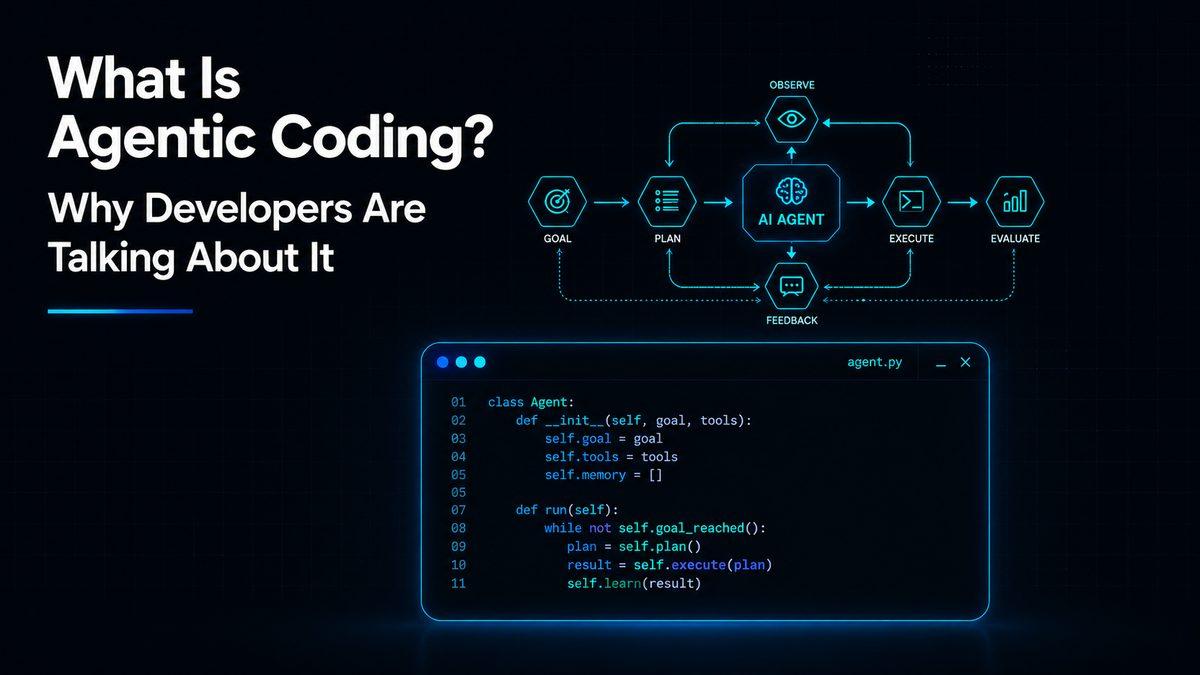
Agentic coding is a way of building software where an AI agent does the work in steps, not just one reply at a time. You give it a goal, such as "add a password reset page" or "fix the failing tests", and the agent reads your project, makes a plan, edits the files, runs commands and tests, checks the results and keeps going until the job is done or it needs your input.
That is the big difference from older AI coding help. Autocomplete suggests the next line while you type. A chatbot gives you a snippet to paste. An agentic coding tool takes the task and carries it through, while you review what it did. This guide explains how it works, how it differs from vibe coding, which agentic coding tools exist in 2026, and how to start safely.
Agentic coding at a glance
Autocomplete | Chat assistant | Agentic coding | |
|---|---|---|---|
What you give it | The code you are typing | A question | A goal or task |
What it does | Suggests the next line or block | Explains and writes snippets | Plans, edits many files, runs commands and tests |
Who applies the changes | You | You, by copying and pasting | The agent, with your approval |
Who checks the result | You | You | The agent first, then you |
Example tools | Copilot code suggestions | ChatGPT, Claude or Gemini in a browser | Claude Code, OpenAI Codex, Copilot agent mode, Cursor Agent |
What is agentic coding?
The word "agentic" means the AI can act on its own towards a goal. In coding, that means the AI does not stop after one answer. It works through a loop of reading, doing and checking.
Anthropic's documentation for Claude Code puts it simply: unlike a chatbot that answers questions and waits, the agent can read your files, run commands, make changes and work through problems on its own. Anthropic used the phrase "agentic coding tool" when it launched Claude Code in February 2025, and the term spread quickly as other companies released their own agents.
In practice, agentic coding looks like this:
You describe a task in plain English.
The agent explores the codebase to understand how things fit together.
It proposes a plan, or starts working if the task is small.
It edits one or many files, runs your tests or build, and reads the output.
If something fails, it fixes the problem and tries again.
It shows you the changes, and you approve, adjust or undo them.
You are still in charge. The agent does more of the typing and the checking, and you decide what goes into the project.
How agentic coding works
Most agentic coding tools follow the same loop. Anthropic's best practice guide describes it as explore, plan, implement, verify and commit.
Explore. The agent opens relevant files, searches the code and reads error messages so it understands the problem before touching anything.
Plan. For bigger tasks it writes out the steps it will take. Many tools have a plan or read only mode, where the agent proposes a plan without changing any files.
Implement. It edits the code, often across several files at once.
Verify. It runs a check you trust, such as tests, a build or a linter, and reads the result. If the check fails, it goes back and fixes the cause.
Commit. When the check passes, it summarises what changed, and you review the difference before saving it to version control or opening a pull request.
Three features make this loop work well:
Project instruction files. A short file in your project tells the agent your rules, such as how to run tests or which folders to avoid. AGENTS.md is an open format supported by many tools, and Claude Code has its own CLAUDE.md. Our guide on how to write AGENTS.md shows what to put in one.
Permissions. Good agents ask before they run commands or edit files, until you choose to give them more freedom. Claude Code, for example, has a default mode that asks first, a plan mode that only reads, and modes with more autonomy meant for isolated environments.
Connections to other tools. The Model Context Protocol (MCP) is an open standard for connecting agents to things like issue trackers, documents and databases. See how developers use MCP servers with Claude Code and Cursor.
Some agents also run in the cloud. You assign a task, close your laptop, and the agent works on a copy of your repository and returns a branch or a pull request for you to review.
A simple example
Say your web app has a bug where the contact form accepts an empty email address. With agentic coding, you could write:
The contact form accepts an empty email. Find where it is validated, add a check that shows an error message, add a test for it, and run the test suite.
A good agent would find the form and its validation code, add the check, write a test, run the tests, fix anything that broke and then show you the changes. Your job is to read the diff, try the form yourself and decide whether to keep it.
Agentic coding vs vibe coding
People often mix these up, but they describe different things.
Vibe coding is a term from Andrej Karpathy, who described it in February 2025 as giving in to the vibes and not really reading the code the AI writes. It became so popular that Collins named it Word of the Year for 2025. Vibe coding is an attitude: you accept what the AI produces and judge it only by whether it seems to work.
Agentic coding describes how the tool works: an AI that plans, acts and checks its own work over many steps. You can use an agentic tool carefully, reviewing every change and running tests, or carelessly, in a vibe coding style.
Vibe coding | Agentic coding | |
|---|---|---|
What it describes | How a person uses AI | How the AI tool works |
Reading the code | Usually skipped | Expected, especially before merging |
Testing | Often informal | Built into the loop |
Good for | Quick prototypes and personal experiments | Real projects, when paired with review |
If you are building something other people will use, treat agentic tools as a very fast assistant whose work you still check, not as a replacement for understanding your own code.
Agentic coding tools in 2026
There are now many agentic coding tools. They fall into three groups: agents that run in your terminal, agents inside a code editor, and agents that run in the cloud and send you pull requests. Here are the main ones, as of October 2026.
Tool | Made by | Where it runs | Free option |
|---|---|---|---|
Claude Code | Anthropic | Terminal, VS Code and JetBrains, desktop app, web and mobile | No, it needs a paid Claude plan or API usage |
OpenAI Codex | OpenAI | Desktop app, terminal, editor extension and cloud | Limited use on free ChatGPT plans; fuller access on paid plans |
GitHub Copilot agent mode and cloud agent | GitHub | Agent mode in your editor; cloud agent on GitHub that opens pull requests | Agent mode is included in Copilot Free with limits; the cloud agent needs a paid plan |
Cursor Agent | Anysphere, now part of SpaceX | The Cursor editor, plus cloud agents | Free plan with limited agent use |
Antigravity CLI | Terminal and desktop | Free individual plan with weekly limits | |
Jules | Cloud, working on your GitHub repositories | Free tier available | |
Cline | Cline (open source) | VS Code extension and terminal | Free; you pay for the AI model you connect |
Aider | Open source community | Terminal | Free; you pay for the AI model you connect, or use a local one |
Google moved individual users from Gemini CLI to the new Antigravity CLI in June 2026, so older tutorials that mention Gemini CLI for personal use are now out of date.
Plans and limits change often, so check each tool's official pricing page before you commit. If you want help picking one, our guide on how to choose an AI coding agent walks through the options, and our comparison of Claude Code vs Cursor vs GitHub Copilot goes deeper on the three most popular.
What agentic coding is good at
Agentic coding shines on work that is clear to describe but slow to do by hand:
Fixing bugs when you can describe the problem or share the error.
Writing tests for code that has none.
Refactoring, such as renaming something used in fifty places or moving to a new library version.
Explaining an unfamiliar codebase, so you can get up to speed on a new project.
Boilerplate, such as setting up a new page, route or configuration.
It is weaker on vague goals, big design decisions and anything where the "right" answer depends on knowledge only you have. For real examples, read 5 real ways developers use agentic coding.
Risks and limits of agentic coding
Agentic coding is powerful, which is exactly why it needs care.
Security. An agent that can run commands can also run the wrong ones. In July 2025, a tampered version of Amazon's Q coding extension shipped with hidden instructions telling the agent to delete files and cloud resources; Amazon said the code was malformed and did not run. In August 2025, attackers behind the Nx "s1ngularity" npm attack tried to use AI command line tools already installed on victims' computers to hunt for secrets, and security firm Wiz counted more than 1,000 valid GitHub tokens leaked. Keep secrets out of your project files and be careful when an agent reads untrusted code or web pages.
Code quality. Security company Veracode tested code from more than 100 AI models and found security flaws in 45% of the samples in 2025. Its 2026 follow up found the picture had barely changed. AI written code needs the same review as code from a new teammate.
Speed is not guaranteed. In a 2025 study by the research group METR, experienced open source developers took 19% longer to finish tasks when using AI tools, even though they believed AI had made them about 20% faster. METR said in 2026 that developers are probably faster now, but its newer data was not reliable enough to give a figure. The lesson is to measure your own results instead of assuming.
Cost. Many agentic coding tools charge by usage or have weekly limits. Anthropic says the average enterprise Claude Code user spends about $13 per active day. Long, unclear tasks burn through limits fastest, so clear instructions save money as well as time.
For a deeper look at using agents on serious projects, read is agentic coding safe for production code.
How to start agentic coding safely
These steps come from the official guidance of the main tools, and they work whichever agent you choose.
Use git, and commit before every task. If the agent makes a mess, you can go back in one command. Built in undo features are useful, but they are not a replacement for version control.
Start small. Pick a task you could do yourself in an hour. Name the files involved and say what "done" looks like.
Ask for a plan first on bigger tasks. Use plan or read only mode, read the plan, and correct it before any code changes.
Give the agent a way to check its work. Tests, a build command or a linter let it catch its own mistakes. Ask it to show you the passing result.
Review every change. Read the diff before you accept it, and keep the default "ask before acting" setting until you trust the tool.
Keep secrets out. Do not paste passwords or API keys into prompts, and keep them out of files the agent can read.
Write a short instruction file. A few lines in AGENTS.md or CLAUDE.md about how to run tests and what to avoid will improve every session.
Before you start, it also helps to plan before you code with AI, so the agent gets a clear brief.
Starting from Nigeria or elsewhere outside the US
Most paid plans are billed in US dollars, so check that your card allows international payments before you subscribe. You can also start for free: Copilot Free includes agent mode, Cursor and Google's Antigravity have free plans, OpenAI offers limited Codex use on free ChatGPT accounts, and open source agents like Cline and Aider let you connect cheaper models. Try a free option on a small project first, and pay only when you know which tool suits you.
Will agentic coding replace developers?
Not on current evidence. It is changing what developers spend their time on. In Stack Overflow's 2026 Developer Survey, 66% of developers who use AI said they use coding agents, with Claude Code and GitHub Copilot the most used. Yet in an April 2026 Stack Overflow survey, 63% of agent users said they rarely or never let agents work on autopilot.
The developers getting the most from agentic coding are the ones who can describe problems clearly, break work into small pieces, and spot when the AI is wrong. Those are skills worth building whether you are a student, a career switcher or a senior engineer.
Frequently asked questions
What is agentic coding in simple terms?
Agentic coding is when an AI agent writes and fixes code for you in steps. You give it a goal, and it reads your project, edits files, runs tests and checks its own work until the task is done, while you review the result.
What is the difference between agentic coding and vibe coding?
Agentic coding describes how the tool works: it plans, acts and checks its work over many steps. Vibe coding describes how a person uses AI: accepting its code without really reading it. You can use an agentic tool carefully or in a vibe coding style.
What are the best agentic coding tools?
The most used agentic coding tools in 2026 are Claude Code and GitHub Copilot, followed by OpenAI Codex and Cursor. Google's Antigravity CLI and Jules, and open source tools like Cline and Aider, are also popular. The best one depends on whether you prefer the terminal, an editor or cloud agents.
Is there a free agentic coding tool?
Yes. GitHub Copilot Free includes agent mode with limits, Cursor and Google's Antigravity have free plans, OpenAI offers limited Codex use on free ChatGPT accounts, and Cline and Aider are free open source tools where you pay only for the AI model you connect. Claude Code needs a paid plan.
Is agentic coding safe?
It can be, if you keep control. Use version control, review every change, keep secrets out of your project files, and leave the "ask before acting" setting on until you trust the tool. Research shows AI written code often contains security flaws, so treat it like code from a new teammate.
Do I need to know how to code to use agentic coding?
You can build simple things without much coding knowledge, but you will get stuck when something breaks. Learning the basics of reading code, using git and running tests makes agentic tools far more useful and much safer.
What is AGENTS.md?
AGENTS.md is a plain text file in your project that tells coding agents how to work with it, such as how to run tests and which rules to follow. It is an open format supported by many tools, including Codex, Copilot, Cursor and Jules, and Claude Code can read it too.
Comments (0)
Sign in to post a comment.
- Be the first to comment.