AI Customer Service on WhatsApp for Small Businesses
Set up AI customer service on WhatsApp for your small business: Meta Business Agent, what to automate, training it on your prices and when to hand over.
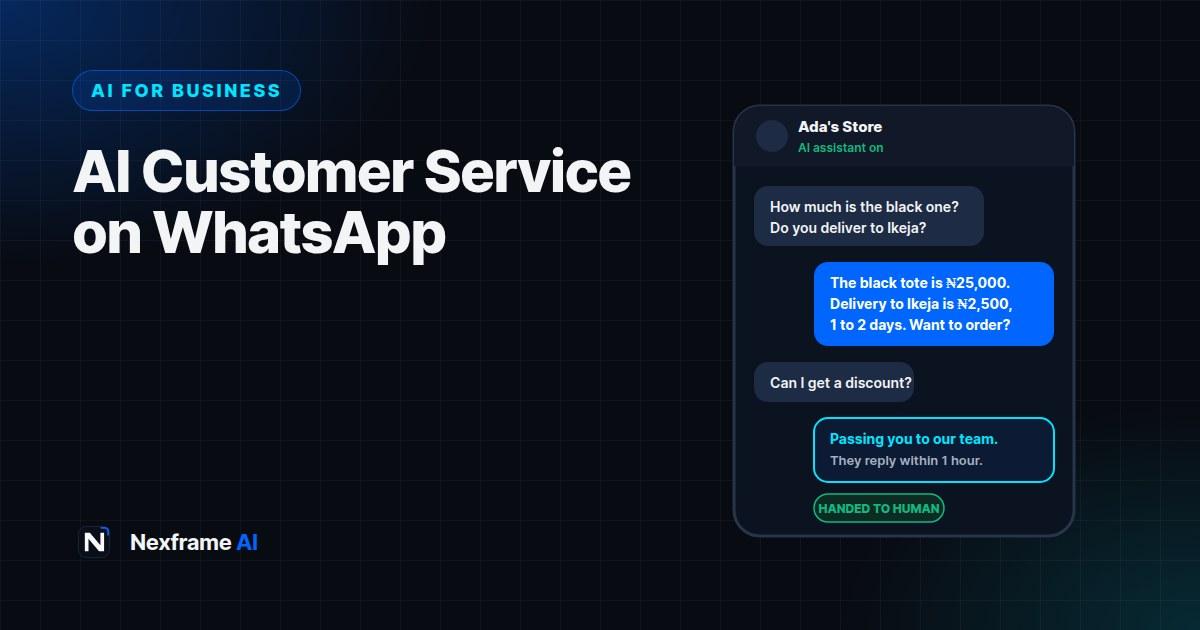
It's 11:40pm. A customer messages your business on WhatsApp: "How much is the black one? Do you deliver to Ikeja?" You're asleep. By morning, they've bought from someone else who replied in two minutes.
For millions of small businesses in Nigeria and across Africa, WhatsApp isn't just a messaging app. It's the shop counter, the sales team and the customer service desk in one. And the businesses that reply fastest usually win the sale.
AI customer service on WhatsApp makes fast replies possible around the clock. In June 2026, Meta made its AI assistant for businesses, Meta Business Agent, available globally, and more than a million businesses were already using it. This guide shows you what AI can and can't do on WhatsApp, how to set it up, how to train it on your real prices and policies, when to hand over to a human, and how to keep customers' trust.
What AI Customer Service on WhatsApp Can Do
An AI assistant connected to your WhatsApp Business account reads incoming messages and replies on your behalf, using information you give it. Meta says its Business Agent can:
Answer common customer questions
Recommend products
Book appointments
Qualify sales leads, for example by asking what the customer needs and their budget
Hand conversations over to a person when needed
It can also reply in the customer's language and in your business's tone, and it works around the clock, so customers get answers outside business hours.
What it shouldn't do is invent prices, make promises you can't keep, or handle complaints and sensitive issues alone. The skill is deciding which jobs to give the AI and which to keep for people.
Your Options in 2026
Meta Business Agent in the WhatsApp Business app. The simplest option for small businesses. You set it up from the business tools section of the app, and it learns from information you provide and your past chats. Getting started is free, and Meta has said businesses will access it through paid WhatsApp Business subscription tiers over time, so check the current pricing in your app.
Suggestions mode. If you're nervous about full automation, you can use AI-suggested replies that you review and send yourself. It's a good way to start: you save typing time while staying in control.
Custom AI agents through the WhatsApp Business Platform. Larger businesses can build agents connected to their own systems, such as an online store or support software, usually with a developer or a specialist provider. This costs more, and pricing is typically based on usage.
For most small businesses, start with the built-in agent or suggestions mode and only consider a custom build once you've outgrown them.
Before You Switch It On: Build Your Knowledge Base
An AI assistant is only as good as the information you give it. This is the step most businesses rush, and it's the one that decides whether customers get helpful answers or confusing ones.
Write down, in plain language:
Your products or services and prices. Every item, size, colour and price. If prices change often, note that customers should confirm before paying.
Delivery details. Areas you deliver to, delivery fees, timelines and whether you offer pickup.
Payment methods. Bank transfer, card, cash on delivery or payment links, and when payment is required.
Opening hours and location. Including how to find you.
Returns, exchanges and refunds. Clear rules, so the AI doesn't improvise.
Frequently asked questions. Look through your last month of chats and list the 20 questions customers ask most.
What the AI must never do. For example: never offer discounts, never confirm stock without checking, never discuss complaints.
You can use AI to turn messy notes into a clean knowledge base:
Here are my notes about my business, products, prices, delivery and policies: [paste].
Organise them into a clear customer service knowledge base with headings. List any
information that's missing or unclear, and suggest 20 common customer questions with
answers based only on these notes. Don't invent prices or policies.
Check every line. If something's wrong in the knowledge base, the AI will repeat it to every customer.
Set Up and Test Before Going Live
Update your WhatsApp Business profile. Add your business description, hours, address and catalogue. The AI and your customers both use this information.
Add your knowledge base in the AI agent settings, following the app's prompts.
Set the tone. Friendly and professional suits most businesses. If your customers usually write in Pidgin or a mix of English and Pidgin, test how the AI handles that.
Define handover rules so the AI passes certain conversations to a person (see below).
Test with friends or staff. Ask them to message like real customers, including tricky questions, complaints and attempts to get a discount.
Fix what goes wrong, update the knowledge base and test again.
Go live gradually. Start with suggestions mode or only out-of-hours replies, then expand once you trust it.
When the AI Should Hand Over to a Human
Good AI customer service knows its limits. Set clear rules for passing conversations to a person, for example when a customer:
Makes a complaint or is clearly upset
Asks for a refund, exchange or discount
Asks about an order that has a problem, such as a late delivery
Wants to place a large or custom order
Asks something the knowledge base doesn't cover
Asks to speak to a person
When the AI hands over, it should tell the customer what happens next, such as "I'll pass this to our team, who usually reply within an hour during opening times." Then make sure someone actually replies.
Keep Customers' Trust
Be honest that it's AI. Customers should know when they're chatting with an automated assistant. A simple line like "Hi, I'm the shop's AI assistant. I can help with prices, delivery and orders, or connect you to the team" sets expectations.
Don't let it guess. If the AI doesn't know, it should say so and hand over, not invent an answer.
Protect customer data. Only collect what you need to fulfil an order, and handle it carefully. In Nigeria, the Nigeria Data Protection Act sets rules for how businesses collect and store personal data. Our guide to writing an AI policy for your small business covers data basics.
Watch for scams using your name. Tell customers which number is your official business account, and that you'll never ask for passwords or one-time codes. Fake accounts copying real businesses are a common scam. Our guide to spotting AI-powered scams explains how impersonation scams work.
A Worked Example: A Fashion Store in Lagos
Adaeze runs a small online fashion store selling through Instagram and WhatsApp. Most messages are the same: prices, sizes, delivery fees and whether an item is in stock.
Knowledge base: She lists every item in her catalogue with sizes and prices, delivery zones across Lagos with fees, payment by transfer before dispatch, and a seven-day exchange policy for unworn items.
Rules: The AI never confirms stock for items marked "limited" and hands those over. It never offers discounts. Complaints go straight to Adaeze.
Testing: Her sister tests it by asking for a discount, asking about delivery to Abuja (not covered) and complaining about a late order. The AI hands over correctly each time, but quotes the old price for one dress. Adaeze fixes the price list.
Going live: She starts with out-of-hours replies only. After two weeks, she turns it on all day, with herself handling handovers.
Result: Customers get instant answers to simple questions, and Adaeze spends her time on orders, complaints and new stock instead of typing the same delivery fees fifty times a day.
Measuring Whether It's Working
Track a few simple numbers each week:
Response time: how quickly customers get a first reply.
Resolution rate: how many conversations the AI handles without a person.
Handovers: how many and why. Repeated handovers on the same question mean your knowledge base needs updating.
Orders from chats: whether sales are going up.
Complaints about the assistant: any sign customers are frustrated.
Review a sample of AI conversations every week. It's the fastest way to spot wrong answers before they cost you customers. The Business Workflows include weekly review routines you can adapt.
Common Mistakes to Avoid
Switching it on without a knowledge base. The AI will give vague or wrong answers.
Out-of-date prices. Update your knowledge base whenever prices or stock change.
No human backup. If handovers go unanswered, customers feel ignored.
Hiding that it's AI. Customers who feel tricked lose trust in your business.
Automating complaints. Upset customers need a person, quickly.
Never reviewing chats. Small errors repeat across hundreds of conversations if nobody checks.
Ready-Made Replies for Common Situations
Give your AI assistant, and your staff, approved wording for the moments that matter most. Consistent replies feel professional and reduce mistakes. Adapt these to your business.
Greeting: "Hi, thanks for messaging [Business Name]! I'm our automated assistant. I can help with prices, sizes, delivery and orders, or connect you to our team."
Out of stock: "Sorry, that item is out of stock right now. We expect more by [date]. Would you like me to suggest something similar, or let the team know you're interested?"
Delivery question: "We deliver across [areas]. Delivery to [area] costs [₦amount] and usually takes [time]. Would you like to place an order?"
Payment: "You can pay by bank transfer to [account details]. Please send a screenshot of your payment, and our team will confirm and arrange dispatch."
Handover: "I'll pass this to our team so they can help properly. They usually reply within [time] during our opening hours of [hours]."
After hours: "We're closed right now, but I can answer most questions. Anything I can't help with, our team will reply when we open at [time]."
Scam warning: "Please note: this is our only official WhatsApp number, and we will never ask for your PIN, password or one-time code."
Add these to your knowledge base so the AI uses them, and save them as quick replies in WhatsApp Business for staff. You can ask an AI assistant to adapt the wording to your tone, or to write versions in Pidgin if your customers prefer it, then check each one with a fluent speaker before using it.
Final Thoughts
AI customer service on WhatsApp can help a small business reply instantly, day and night, without hiring a support team. It works best when you give it accurate information, clear limits and a human to step in when it matters.
Start with your knowledge base, test thoroughly, go live gradually and review conversations every week. Done well, it frees you to focus on what grows your business.
To make your product information clearer for both the AI and your customers, see our guide to writing AI product descriptions that sell. And if you'd like to offer WhatsApp AI setup as a service to other businesses, it's on our list of no-code AI services you can sell this month.
Frequently Asked Questions
Is Meta Business Agent available in Nigeria?
Meta made Business Agent available to businesses globally in June 2026. Check the business tools section of your WhatsApp Business app to see the options available on your account.
Is AI customer service on WhatsApp free?
Getting started with Meta Business Agent is free, and Meta has said businesses will access it through paid subscription tiers over time. Custom agents on the WhatsApp Business Platform are usually paid based on usage. Check current pricing before you commit.
Can the AI reply in Pidgin?
Meta says the agent can reply in the customer's language and your business's tone. Test it with Pidgin and mixed-language messages before relying on it, since quality can vary.
Will customers know they're talking to AI?
They should. Tell customers clearly that they're chatting with an automated assistant and how to reach a person. Honesty builds trust.
Can AI take payments on WhatsApp?
It can share payment details and links you provide. Make sure a person confirms payments before dispatching orders, and never let the AI ask for card PINs or one-time codes.
What should I never let the AI do?
Invent prices, offer discounts you haven't approved, handle complaints alone, or collect more personal data than an order needs.
How do I stop the AI giving wrong answers?
Keep your knowledge base accurate and up to date, set clear rules for what it shouldn't answer, test it regularly and review real conversations every week.
Do I still need staff if I use AI customer service?
Yes. AI handles simple, repetitive questions. People are still needed for complaints, unusual requests, big orders and checking the AI's work.
Comments (0)
Sign in to post a comment.
- Be the first to comment.