RAG for Beginners: Build a Chatbot on Your Own Docs
RAG for beginners: build a chatbot that answers from your own documents. Learn chunking, embeddings, retrieval, citations and how to test answers properly.
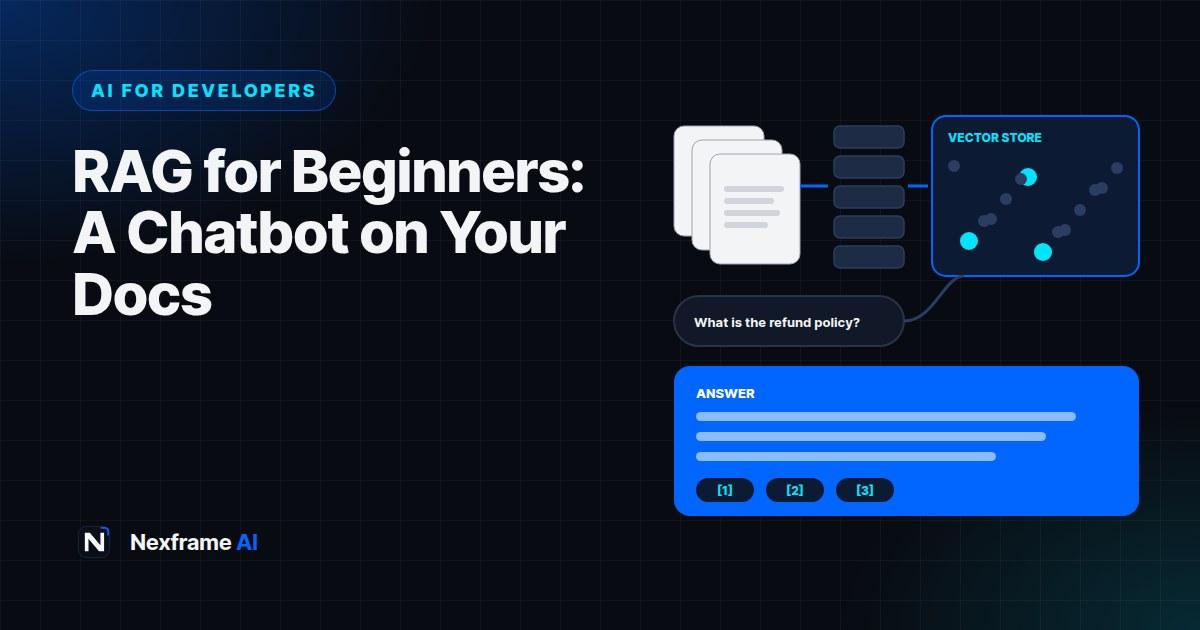
Ask a general AI chatbot about your company's refund policy, your product's setup steps or what's in last quarter's board report, and it will either say it doesn't know or, worse, confidently make something up. The model was never trained on your documents.
Retrieval-augmented generation, or RAG, fixes this. Instead of hoping the model knows the answer, your app first finds the most relevant passages from your own documents, then gives them to the model with the question. The model answers using that material, and can cite where each answer came from.
RAG powers help-centre bots, internal knowledge assistants, study tools and document Q&A features. It's also one of the most practical AI patterns a developer can learn. This guide explains RAG for beginners: how it works, the building blocks, a step-by-step build, how to make answers accurate and how to test it before real users rely on it.
How RAG Works
RAG has two phases.
Indexing (done in advance):
Collect your documents.
Split them into small chunks.
Convert each chunk into an embedding, a list of numbers that captures its meaning.
Store the chunks and embeddings in a database that can search by similarity.
Answering (done for each question):
Convert the user's question into an embedding.
Find the chunks whose embeddings are most similar to the question.
Send the question and those chunks to the AI model, with instructions to answer only from them.
Return the answer, ideally with citations to the source chunks.
Think of it as an open-book exam: the model doesn't need to memorise your documents; it just needs to find the right pages and read them carefully.
When to Use RAG (and When Not To)
RAG is a good fit when:
You have a body of documents that changes over time, such as policies, product docs or course materials.
Answers need to be grounded in specific sources.
You want citations so users can check answers.
The documents are too large to paste into every request.
You may not need RAG when:
Your content is small enough to include directly in the prompt. Modern models have large context windows, and for a few pages, pasting them in is simpler.
You need the model to learn a style or format rather than facts. Better prompting or examples may work better.
The answer requires live data, such as stock levels or account balances. Use direct database or API lookups for those.
If you just want to ask questions across your own files without building anything, tools like Gemini Notebook already do source-grounded Q&A with citations.
The Building Blocks
Documents. PDFs, web pages, Markdown files, help articles, transcripts or database records.
A chunker. Code that splits documents into passages, often a few hundred words each, with a little overlap so ideas aren't cut in half.
An embeddings model. Converts text into vectors. Providers such as OpenAI, Google and Voyage AI offer embedding models via API, and there are open-source options you can run yourself.
A vector store. A database that searches by similarity. Options include PostgreSQL with the pgvector extension, which many teams already use, and dedicated vector databases.
A generation model. The AI model that writes the answer, such as Claude, GPT or Gemini.
Your app. The glue: an API endpoint that takes a question, retrieves chunks, calls the model and returns the answer.
Step-by-Step: A Simple RAG Chatbot
This example uses PostgreSQL with pgvector and shows the logic in JavaScript-style pseudocode. Adapt it to your stack.
Step 1: Prepare and chunk documents
Clean your documents first: remove navigation menus, repeated headers and footers, and anything irrelevant. Then split them into chunks.
function chunkText(text, size = 800, overlap = 150) {
  const chunks = [];
  for (let start = 0; start < text.length; start += size - overlap) {
    chunks.push(text.slice(start, start + size));
  }
  return chunks;
}
This splits by characters for simplicity. Better chunkers split on headings, paragraphs or sentences so each chunk is a complete idea. Keep metadata with every chunk, such as the document title, section and URL, so you can cite sources later.
Step 2: Create embeddings and store them
CREATE EXTENSION IF NOT EXISTS vector;

CREATE TABLE chunks (
  id serial PRIMARY KEY,
  doc_title text,
  section text,
  url text,
  content text,
  embedding vector(1536)  -- match your embeddings model's dimensions
);
for (const chunk of chunks) {
const embedding = await embed(chunk.content); // call your embeddings API
await db.query(
"INSERT INTO chunks (doc_title, section, url, content, embedding) VALUES ($1,$2,$3,$4,$5)",
[chunk.title, chunk.section, chunk.url, chunk.content, toVector(embedding)]
);
}Step 3: Retrieve relevant chunks for a question
async function retrieve(question, k = 5) {
  const q = await embed(question);
  const { rows } = await db.query(
    "SELECT doc_title, section, url, content FROM chunks ORDER BY embedding <=> $1 LIMIT $2",
    [toVector(q), k]
  );
  return rows;
}
The <=> operator finds the closest matches by cosine distance. Five chunks is a sensible starting point; tune it later.
Step 4: Generate a grounded answer
const SYSTEM = `You answer questions using ONLY the sources provided.
- If the sources don't contain the answer, say you don't know and suggest contacting support.
- Cite sources as [1], [2] matching the numbered sources.
- Be concise and use plain English.`;

async function answer(question) {
  const sources = await retrieve(question);
  const context = sources
    .map((s, i) => `[${i + 1}] ${s.doc_title} - ${s.section}\n${s.content}`)
    .join("\n\n");
  const reply = await callModel({
    system: SYSTEM,
    user: `Sources:\n${context}\n\nQuestion: ${question}`,
  });
  return { reply, sources };
}
Return the sources with the answer so your UI can show clickable citations. Our guide to building your first app with an AI API covers calling the model, streaming and error handling.
Making Answers Accurate
A basic RAG system works surprisingly well, but these improvements make a real difference:
Better chunking. Split on headings and paragraphs, not arbitrary character counts. Include the document title and section in each chunk's text so it makes sense on its own.
Hybrid search. Combine similarity search with keyword search. Embeddings are good at meaning, but keyword search catches exact terms like product codes, names and error messages.
Re-ranking. Retrieve more chunks than you need, say 20, then use a re-ranking model or a quick model call to pick the best 5.
Query rewriting. Vague or follow-up questions like "what about refunds?" retrieve poorly. Rewrite them into full, standalone questions using the conversation history before searching.
Metadata filters. Filter by document type, date, product or user permissions before searching, so users only see relevant and allowed content.
Keep the index fresh. Re-index documents when they change, and remove outdated versions so old policies don't appear in answers.
Say "I don't know". Instruct the model to refuse when sources don't contain the answer. A clear "I don't know" is far better than a confident guess.
Testing Your RAG System
Don't launch on vibes. Build a small evaluation set:
Write 30 to 50 real questions your users are likely to ask, including tricky ones.
Record the correct answer and source for each.
Run them through your system and check two things separately: did retrieval find the right chunks, and did the model answer correctly from them?
Include questions with no answer in your documents, to check the model says so rather than inventing something.
Re-run after every change to chunking, retrieval or prompts.
Separating retrieval from generation is the key debugging habit. If the right chunk wasn't retrieved, improve chunking or search. If it was retrieved but the answer was wrong, improve the prompt or model.
A Worked Example: A Help-Centre Bot
A small fintech wants a chatbot that answers customer questions from its 60 help-centre articles.
Indexing: The team exports articles as Markdown, splits them by headings, adds the article title to each chunk and stores embeddings in their existing PostgreSQL database with pgvector.
Answering: Questions are rewritten into standalone form, the top 20 chunks are retrieved and re-ranked to 5, and the model answers with citations, linking to the source articles.
Testing: A 40-question test set reveals that questions using product codes often fail. Adding keyword search alongside similarity search fixes most of them.
Guardrails: The bot says "I don't know" when articles don't cover something and offers to connect the customer to support. Questions about specific account balances are routed to the logged-in account system, not RAG.
Result: The bot handles common questions accurately, and every answer links to the article it came from, which builds trust.
Security and Privacy
RAG systems handle your documents and users' questions, so protect both:
Respect permissions. If some documents are private, filter retrieval by the user's access rights. Never let the bot reveal content a user shouldn't see.
Watch for prompt injection. Documents or user inputs may contain instructions that try to override your system prompt. Treat retrieved text as data, not instructions.
Protect personal data. Avoid indexing sensitive personal information unless necessary, and follow data protection rules such as Nigeria's Data Protection Act.
Log carefully. Don't store sensitive questions and answers longer than needed.
Our guide to securing AI features in your app covers these risks in detail.
Common Mistakes to Avoid
Messy source documents. Garbage in, garbage out. Clean before indexing.
Chunks without context. Include titles and sections so chunks make sense alone.
No "I don't know" rule. Without it, the model fills gaps with guesses.
Similarity search only. Add keyword search for exact terms.
Stale indexes. Re-index when documents change.
No evaluation set. You can't improve what you don't measure.
Running RAG in Production
Building the first version is the easy part. Keeping it accurate as documents and users change takes a little ongoing work.
Automate re-indexing. Set up a job that re-indexes documents when they're added, changed or deleted, rather than rebuilding everything by hand. Track a version or updated date for each document so you only re-embed what changed.
Collect feedback. Add a simple thumbs up and thumbs down to every answer, with an optional comment. Review negative feedback weekly; it shows you exactly where retrieval or answers fail.
Log questions and sources. Record which chunks were retrieved for each question, with personal details redacted. When an answer is wrong, you can see whether the right source was found.
Watch for gaps. Questions that repeatedly get "I don't know" answers often reveal missing documentation. Fixing the docs fixes the bot, and helps human readers too.
Track costs. Embedding documents is usually cheap and happens once per change; answering questions costs more because it happens on every request. Monitor both, and cache answers to very common questions.
Keep your test set growing. Add real questions from users, especially ones that failed, to your evaluation set. Over time, it becomes the most valuable asset in your RAG system.
Review sources regularly. Outdated or contradictory documents produce confusing answers. Assign someone to own the knowledge base, just as someone owns the code.
With these habits, a RAG system gets better every month instead of slowly drifting out of date. It's the same principle behind a good personal knowledge base, covered in our guide to building an AI second brain.
Final Thoughts
RAG for beginners comes down to a simple idea: find the right passages from your documents, then ask the model to answer only from them, with citations. A basic version can be built in a day; making it accurate is about clean documents, good chunking, smarter retrieval and honest testing.
Start with a small set of documents and 30 real questions. Build the simple version, measure it, and improve one thing at a time. You'll end up with an assistant your users can actually trust.
If you're building with a coding agent, give it a clear AGENTS.md describing your stack and testing approach. And for research-style workflows that pair well with RAG, see the Research Workflows.
Frequently Asked Questions
What is RAG in AI?
Retrieval-augmented generation is a technique where an app retrieves relevant passages from your own documents and gives them to an AI model, so it answers from those sources rather than from memory alone.
Do I need a vector database for RAG?
You need somewhere to store embeddings and search by similarity. PostgreSQL with pgvector works well for many projects; dedicated vector databases suit very large scale.
What are embeddings?
Lists of numbers that represent the meaning of text. Similar meanings have similar embeddings, which lets you find relevant passages for a question.
How big should chunks be?
A few hundred words is a common starting point, split on headings or paragraphs with a little overlap. Test different sizes with your own documents.
Does RAG stop AI from making things up?
It greatly reduces it, especially with instructions to answer only from sources and say "I don't know" otherwise, but you still need testing and citations.
Is RAG better than fine-tuning?
For answering questions from changing documents, RAG is usually simpler, cheaper and easier to update. Fine-tuning is better for teaching style or format.
Can I build RAG without coding?
Some no-code tools offer document Q&A, and Gemini Notebook answers questions across your files with citations. For custom apps, you'll need some coding.
How do I know if my RAG system is accurate?
Build a test set of real questions with known answers, check retrieval and generation separately, and include questions with no answer to test refusal.
Comments (0)
Sign in to post a comment.
- Be the first to comment.