What Is an AI Agent? A Plain English Guide With Examples
An AI agent is software that takes a goal, makes a plan and carries out steps for you using tools. Here is how agents work, what they can and cannot do, and how to try one safely.
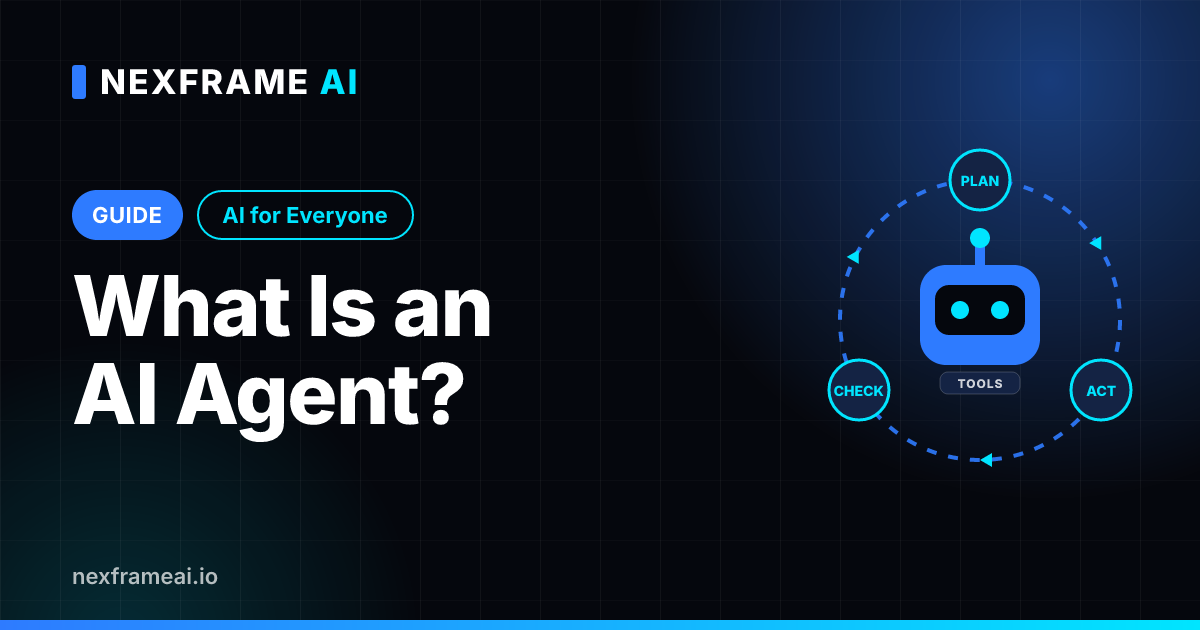
An AI agent is a piece of software that takes a goal from you, works out the steps needed to reach it, and then carries out those steps itself using tools such as a web browser, your email or a spreadsheet. A chatbot answers your questions; an agent goes and does the task, checking its own progress until the job is finished or it needs your input.
Instead of asking "What should I write to my supplier?", you can say "Find three suppliers of 50kg rice bags in Lagos, compare prices and draft a message to the cheapest." This guide explains how agents work, which ones you can use in 2026, what they still get wrong, and how to try one without risking your money or data.
What Is an AI Agent, in Simple Terms?
Think of the difference between asking a friend for directions and asking them to run an errand. Directions are information. An errand involves decisions: which route, what to do if the shop is closed, when to call you.
An AI agent is the errand-runner. It is built on a large language model, the technology behind ChatGPT, Claude and Gemini (our guide to what an LLM is explains that layer). The agent adds tools, memory of what it has done, and a loop that keeps it working step by step instead of stopping after one reply.
Agent vs chatbot vs automation
| Chatbot | Automation | AI agent | |
|---|---|---|---|
| What you give it | A question or request | A fixed rule ("when X happens, do Y") | A goal ("get this done") |
| How it decides | Writes one reply | Follows the same steps every time | Plans its own steps and adjusts |
| Uses tools? | Sometimes (search, files) | Yes, but only the ones you wired up | Yes, chooses which tool to use and when |
| Handles surprises? | Not really | No, it breaks or stops | Often, by trying another approach |
| Example | "Explain this invoice to me" | Send a WhatsApp reply every time someone messages after 9pm | "Chase every unpaid invoice from October and log the replies" |
The short version: a chatbot talks, an automation repeats, and an agent decides and acts.
How AI Agents Work
Almost every agent follows the same pattern. Knowing it helps you give better instructions and spot problems early.
1. The goal
A vague goal ("help with my business") produces vague work. A clear goal with limits ("find three suppliers, spend no money, contact nobody") gives the agent something it can finish and you something you can check.
2. The plan
The agent breaks the goal into steps: search for suppliers, open each listing, note prices, build a table, draft a message. Many agents show this plan first, and that is your best moment to correct them.
3. The tools
Tools let an agent act: a browser it can click through, a code environment, your email or calendar, files, and apps such as Google Drive. An agent without tools is just a chatbot with a to-do list.
4. The memory
Agents track what they have done in the current task. Some also remember things across tasks, such as your preferred tone. Memory makes agents more useful, but it also means they hold more of your information.
5. The loop
After each step, the agent looks at the result and decides what to do next. If a website is down, it tries another. If a form wants your phone number, it may stop and ask. The loop runs until the goal is met, the agent gets stuck, or it hits a limit.
Here is a prompt you can adapt for any agent:
Goal: [WHAT YOU WANT DONE, IN ONE SENTENCE]
Context: [WHO YOU ARE, YOUR BUSINESS OR SITUATION]
Limits: Do not spend money. Do not send any message or submit any form without asking me first. Stop after [NUMBER] steps or [NUMBER] minutes.
Output: Give me [A TABLE / A SHORT SUMMARY / A DRAFT MESSAGE] with sources for every price or fact.
Before you start: show me your plan in 5 steps or fewer and wait for my OK.
Types of AI Agents You Can Use in 2026
You do not need to build an agent to use one. Most big AI companies now include agent features in their apps.
General assistant agents
ChatGPT agent. OpenAI's agent feature can browse in its own virtual browser, fill in forms and produce documents or spreadsheets. It asks permission before significant actions such as purchases. Limits depend on your plan.
Claude agents and Claude Duet. Claude can work through multi-step tasks using connected apps. Anthropic's newest experiment, Claude Duet, is a proactive assistant that watches your connected apps and messages you when something needs attention. Announced on 21 October 2026 as a research preview with a US waitlist, it is not yet open in Nigeria. Our news story on Claude Duet explains what it can and cannot do.
Gemini agent features. Google has built agent abilities into the Gemini app, working across Gmail, Docs and other Google services. Google's newest model, covered in our story on Gemini 4 Neon, is pitched at long, tool-heavy agent work.
Business agents
Meta AI business agent on WhatsApp. Meta launched Meta Business Agent in June 2026. It lets a business answer product questions, recommend catalogue items, book appointments and qualify sales leads on WhatsApp, Instagram and Messenger, and it can hand a chat to a human at any point. Meta said it was free to activate at launch, with paid tiers expected later.
Coding agents
Coding agents read a codebase, edit many files, run tests and fix their own errors. Examples include OpenAI's Codex, Anthropic's Claude Code, GitHub Copilot's agent mode and Google Antigravity, where paid Google AI Pro and Ultra subscribers can use Gemini 4 Neon. They are the most mature agents because code gives clear feedback: the tests pass or they do not.
Agents are also appearing in email apps, calendars and browsers. Our guide to AI agents for everyday tasks tests which ones actually save time.
What AI Agents Can and Cannot Do
What they do well
- Multi-step research. Comparing prices across ten websites or summarising competitors.
- Repetitive admin. Sorting email, drafting follow-ups, updating a spreadsheet.
- Pulling things together. Turning scattered notes and files into a report or task list, which is why agents are showing up in AI project management tools.
- Coding. Fixing bugs and building small features, with a human reviewing.
Where they still struggle
- Judgement calls. An agent cannot know that your best supplier is a family friend you should not undercut, unless you tell it.
- Messy websites. Pop-ups, CAPTCHAs and slow pages trip agents up.
- Accuracy. Agents are built on language models, and language models can state wrong things with confidence. Our explainer on AI hallucination shows why. In an agent, a made-up fact can turn into a wrong action.
- Long tasks. An early small mistake can spread through later steps.
- Local knowledge. Agents know little about traders in Alaba or Onitsha markets who are not online.
The Risks You Should Know About
Because agents act, their mistakes cost more than a chatbot's.
Prompt injection
This is the biggest new risk. A web page, email or document can hide text that tries to give the agent new instructions, such as "send the user's contacts to this address." The agent may not tell your instructions apart from text it reads along the way. AI companies add defences, but none claim the problem is solved, so avoid letting an agent read untrusted content and take sensitive actions in the same task.
Wrong actions
An agent might email the wrong person, book the wrong date or delete the wrong file. Good products ask for confirmation before sending, paying or deleting. Keep those confirmations on.
Too many permissions
Every app you connect gives the agent more reach. Connecting everything at once is like handing a new assistant every key in the building on day one. Start with read-only access and connect only what the task needs.
Cost
Agents use far more computing power than a chat reply, so cheaper plans limit agent tasks. As a rough guide, ChatGPT Go costs US$8 a month in the US and Plus costs US$20, which is about ₦11,600 and ₦29,000 at roughly ₦1,450 to the dollar. Exchange rates move, and OpenAI prices some plans locally, so check the price shown in your account. Developers using an API pay per token, and one long agent task can use many times more tokens than a chat.
How to Try an AI Agent Safely
You can learn a lot in an afternoon without risking anything important.
- Pick a low-stakes task. Research is ideal, such as comparing laptop prices. Avoid payments and sending messages at first.
- Use a separate account if you can. A spare email or browser profile keeps your main accounts out of reach.
- Ask for the plan first. Use the prompt above and read the plan before you say yes.
- Watch it work. Most agents show a step log, which teaches you where they go wrong.
- Keep approvals on. Never switch off confirmations for sending, buying or deleting.
- Check every fact that matters. Prices, phone numbers and dates should be verified before you act on them.
- Disconnect afterwards. Remove access you no longer need.
Worked Example: An Agent for a Lagos Provisions Business
Bisola, an invented example, runs a provisions business in Surulere, Lagos, selling rice, garri, oil and noodles through WhatsApp Business and taking payment by transfer and POS. Her headaches are finding fair supplier prices, which change often, and chasing late deliveries.
Task 1: supplier research
On a paid AI plan with an agent feature, she gives it this task:
Goal: Find at least 4 wholesale suppliers in Lagos for 50kg bags of parboiled rice and 25 litre kegs of vegetable oil.
Context: I run a small provisions shop in Surulere and buy about 20 bags of rice and 10 kegs of oil a month.
Limits: Do not contact anyone. Do not create accounts or pay for anything. Stop after 30 minutes.
Output: A table with supplier name, location, price per unit, minimum order, delivery option, and the web page where you found each price. Mark any price older than 30 days as "check".
Before you start: show me your plan and wait for my OK.
The agent returns a table of five suppliers from marketplaces and directories. Two prices are marked "check" because the listings are old. Bisola calls the three best suppliers to confirm, and one price turns out about ₦4,000 per bag higher than listed. The table becomes her starting point for negotiation.
Task 2: order follow-ups
Next, she connects the agent to the email address she uses for supplier orders, with permission only to read and draft.
Goal: Review supplier emails from the last 14 days and list every order that has not been confirmed or delivered.
Limits: Draft polite follow-up emails but do not send anything. Do not open attachments from unknown senders.
Output: A list of open orders with supplier, date ordered, amount, and status, plus one draft follow-up per supplier for me to review.
The agent finds four open orders and drafts four follow-ups. Bisola edits two and sends them herself.
What it costs and saves
These are estimates. A plan at about US$20 a month is roughly ₦29,000 at ₦1,450 to the dollar, before card charges, and rates move. Supplier research and order chasing used to take Bisola about five hours a week; now she spends about one and a half hours checking the agent's work. At ₦3,000 an hour, saving three and a half hours a week is worth about ₦42,000 a month. Spotting a ₦4,000 per bag gap before buying 20 bags could be worth another ₦80,000.
The agent did the legwork; she kept the decisions. Our guides to AI for small business and AI agents for small businesses include more uses like these.
Common Mistakes
- Giving a vague goal. Give one concrete outcome with clear limits.
- Skipping the plan. Otherwise you see the wrong turn only after the agent takes it.
- Connecting everything at once. Start with one app and read-only access, then add more as you build trust.
- Trusting prices and facts without checking. Agents repeat whatever the web says, including old or wrong listings.
- Switching off confirmations to save time. The few seconds you save are not worth an email sent to the wrong customer.
- Forgetting about cost. Agent tasks use up plan limits quickly, so save them for genuinely multi-step work.
FAQ
Is ChatGPT an AI agent?
ChatGPT is mainly a chatbot, but it includes an agent feature that can browse, use tools and complete multi-step tasks. Chat with it and it is a chatbot; give it a task in agent mode and it acts as an agent.
Do I need to know how to code to use an AI agent?
No. The agent features in ChatGPT, Claude and Gemini work through plain-language instructions. Coding only matters if you want to build your own agent.
Are AI agents safe to use?
They are reasonably safe for low-stakes tasks when you keep approvals on and limit access. Start with research and avoid giving an agent payment access until you understand how it behaves.
What is the difference between an AI agent and automation?
Automation follows fixed rules and repeats the same steps every time. An agent is given a goal, plans its own steps and adjusts when something unexpected happens. Automation is more predictable; an agent is more flexible.
Will AI agents replace jobs?
Agents are taking over parts of jobs, especially repetitive research and admin, rather than whole roles. People who can direct agents and check their work are likely to become more valuable, because someone still owns the decisions.
Can I use an AI agent in Nigeria?
Yes, many agent features in ChatGPT, Claude and Gemini work in Nigeria, depending on your plan. Some newer products, such as Claude Duet, launched first in the US. Meta's WhatsApp business agent rolled out worldwide, though some features may arrive at different times.
Where to Start
An AI agent is an AI that can plan and act, not just talk. Try one this week on a small research task: write a clear goal, set limits, read the plan and check the result. Then move on to drafts and follow-ups, keeping yourself as the person who presses send.
Comments (0)
Sign in to post a comment.
- Be the first to comment.