Perplexity vs ChatGPT: Which Is Better in 2026?
Perplexity vs ChatGPT in 2026: compare research, writing, plans, prices and ads, with a clear verdict on which to use for study, work and business
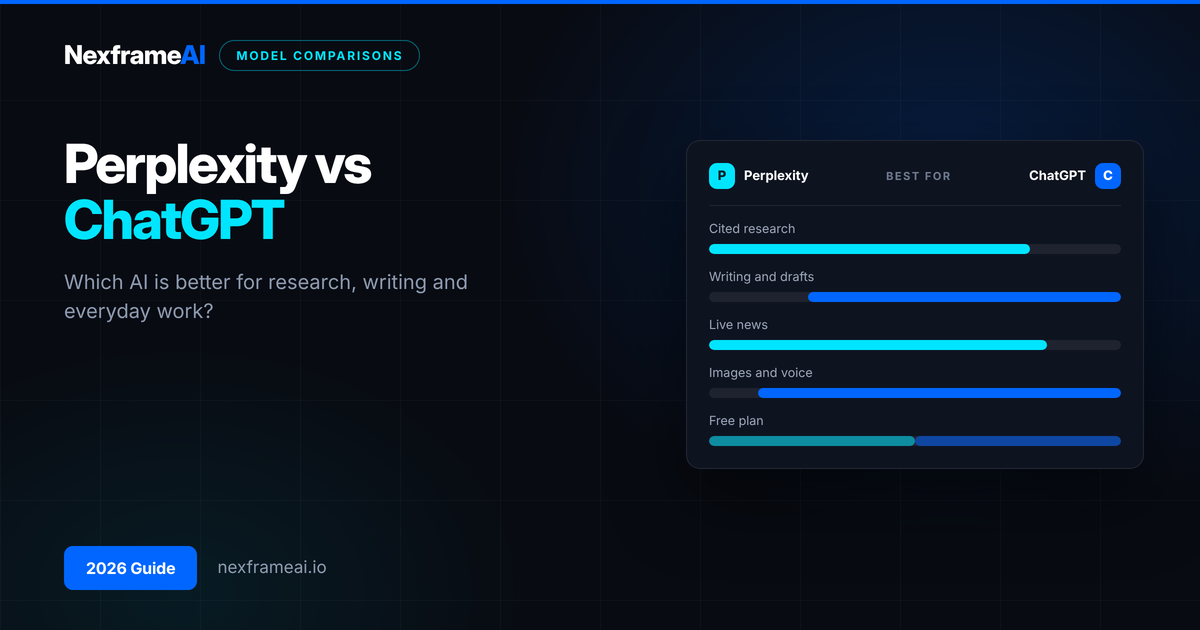
Perplexity vs ChatGPT is one of the most common questions we get, and the honest answer is that they're built for different jobs. Perplexity is an answer engine: it searches the web, reads sources and gives you a short answer with citations you can check. ChatGPT is an all-round assistant: it writes, reasons, codes, makes images, talks to you and can search the web too.
So which is better in 2026? If your main job is finding and checking information, Perplexity usually wins. If your main job is creating something (an essay draft, a business plan, code, a presentation), ChatGPT usually wins. Many people end up using both: Perplexity to research, ChatGPT to write.
Below, we compare them side by side on research, writing, plans, prices, privacy and ads, then give a verdict for students, job seekers, creators and small business owners.
Perplexity vs ChatGPT at a Glance
Prices and plan features change often. The details below were checked at the time of writing (early November 2026), so check the official pricing pages before you pay.
Perplexity | ChatGPT | |
|---|---|---|
Best at | Researched answers with citations | Writing, reasoning, coding, creative work |
Free plan | Yes: default Sonar model, a small daily allowance of Pro Searches, limited Deep Research | Yes: GPT-6 Luna, with usage limits and ads in supported countries, including Nigeria |
Cheapest paid plan | Pro at $20 a month (Education Pro at about $10 for verified students and teachers) | Go, priced lower than Plus and varying by country (it may show ads) |
Mid plan | Pro: choose between OpenAI, Anthropic and Google models plus Sonar | Plus at $20 a month: GPT-6 Sol, deep research, Codex, projects, memory |
Top individual plan | Max at $200 a month | Pro, from around $100 a month at the time of writing |
Citations | Every answer, by default | When it searches the web, not for every answer |
Agent features | Perplexity Computer (credit-based) and the free Comet browser | Agent mode and Codex on paid plans |
Ads | Not a core part of plans at the time of writing | On Free and Go in 26+ countries |
How Each One Works
Understanding what's under the bonnet helps you choose.
ChatGPT is built on OpenAI's own large language models. Since 7 to 8 October 2026, paid plans use GPT-6 Sol and the free plan uses GPT-6 Luna. The model answers from what it learned during training, and it can also search the web when your question needs fresh information. If you're unsure what a language model is, our beginner's guide, What Is an LLM?, explains it simply.
Perplexity also uses large language models, but it wraps them in a search engine. When you ask a question, it searches first, picks sources, then asks a model to write an answer based on those sources, with numbered citations. On paid plans you can choose which model writes the answer, including models from OpenAI, Anthropic and Google, as well as Perplexity's own Sonar.
That design difference explains most of what follows. Perplexity is search-first. ChatGPT is conversation-first.
Research and Fact-Finding
This is Perplexity's home ground.
Perplexity strengths:
Every answer shows its sources, so you can click through and check.
It's good at current events, prices, product comparisons and "what's the latest on…" questions.
Deep Research produces longer, multi-source reports in a few minutes.
Focus options let you narrow searches, for example to academic papers.
ChatGPT strengths:
Its search mode and deep research are strong, especially for questions that need reasoning across many sources.
It's better at following up: "Now turn that into a table and explain point 3 to a 15-year-old."
Where both fail: Both can still get things wrong. Perplexity sometimes cites a source that doesn't say what the answer claims. ChatGPT can state outdated or invented facts with confidence. Our guide to AI hallucination explains why, and our AI fact checker workflow shows how to verify claims before you rely on them.
If you're mainly deciding whether to replace Google, read our separate comparison, Perplexity vs Google.
Verdict: Perplexity, for most research tasks, because checking sources is built in.
Writing and Creative Work
This is where ChatGPT pulls ahead.
ChatGPT is better at long, structured writing: essays, cover letters, reports, scripts, social posts and emails. It keeps a consistent voice across a long conversation, remembers your preferences if you turn memory on, and lets you organise work into projects. It can also generate images, read uploaded files and edit documents in Canvas.
Perplexity can write, but its answers are shaped like search results: short, factual and citation-heavy. Ask it for a 1,500-word blog post with a warm tone and it'll do it, but it doesn't feel like its natural mode.
Here's a prompt that works well in ChatGPT once you've done your research elsewhere:
Here are my research notes on [topic], with sources:
[paste notes and links]
Write a [type of document] for [audience] in [tone].
Use only the facts in my notes. If something is missing, say "[CHECK]" instead of guessing.
Structure: [headings you want]. Length: about [number] words.
Verdict: ChatGPT, clearly.
Coding, Data and Agents
ChatGPT is the stronger tool for coding. Plus and higher plans include Codex, OpenAI's coding agent, and ChatGPT handles spreadsheets and data analysis well.
Perplexity's agent features are different. Perplexity Computer can carry out multi-step tasks using credits, and Perplexity Labs builds reports, dashboards and simple apps from a single brief. Our explainer on Perplexity Labs covers what it can and can't do. Perplexity's Comet browser, which is free, adds an AI assistant to your web browsing.
Verdict: ChatGPT for coding and data work. Perplexity is interesting for research-heavy agent tasks.
Plans and Prices Compared
Perplexity plans
At the time of writing, according to Perplexity's published plans and recent pricing round-ups:
Free: default model, a small daily allowance of Pro Searches, very limited Deep Research.
Education Pro: about $10 a month for verified students and educators.
Pro: $20 a month (or $200 a year). Model choice, more Pro Searches, Deep Research, Labs, image generation and some Computer use.
Max: $200 a month. Higher limits, monthly Computer credits and early access to the newest models.
ChatGPT plans
Free: GPT-6 Luna with limits; shows ads in supported countries.
Go: cheaper than Plus, with higher limits than Free; may show ads. Price varies by country. Our ChatGPT Go vs Plus guide breaks this down.
Plus: $20 a month. GPT-6 Sol, deep research, Codex, projects and memory.
Pro: higher-priced tiers for heavy users, from around $100 a month at the time of writing.
What that means in naira
At $20 a month, Perplexity Pro and ChatGPT Plus cost roughly ₦30,000 a month each at current exchange rates. That's an estimate: your bank's rate, card fees and any app-store markup can push it higher. Paying for both is around ₦60,000 a month, which is a lot for most students. Perplexity's Education Pro, if you qualify, roughly halves its cost.
Ads
ChatGPT now shows ads on its Free and Go plans in 26+ countries, including Nigeria. See ChatGPT ads in Nigeria and South Africa for what that means and how targeting works. Plus and higher plans don't show them.
Everyday Use: Apps, Voice and Files
Both tools have web, Android and iOS apps, and both let you upload documents and images and ask questions about them.
ChatGPT feels more like a companion you talk to. Its voice mode is natural for practising interview answers, rehearsing a pitch or getting a topic explained while you cook. Memory and projects mean it can keep context about your course, your business or your writing style across many chats.
Perplexity feels more like a smarter search box. You ask, scan the answer, click a source and move on. Threads keep your follow-up questions together, and Spaces let you group research on one topic with your own files.
On a slow or expensive mobile connection, Perplexity's short answers can use less data per question. ChatGPT's longer replies and image generation use more. Small differences, but they add up on a tight data plan.
Verdict: ChatGPT for conversation and voice; Perplexity for quick lookups.
Privacy and Accuracy
Both companies say they protect user data, and both offer settings to limit how your chats are used. On free plans especially, assume your conversations may be used to improve their products unless you turn that off. Don't paste passwords, BVN details, client data or anything confidential into either tool.
For accuracy, Perplexity's citations make mistakes easier to spot, not impossible to make. Always click through on anything important: grades, money, health or legal matters.
Who Should Use Which?
Students
Use Perplexity to find sources and check facts for assignments and projects. Use ChatGPT (or a free alternative) to plan essays, explain hard topics step by step and test yourself. If you can only pay for one, Perplexity Education Pro is often the better value for research-heavy courses.
Job seekers
ChatGPT is more useful day to day: tailoring CVs, drafting cover letters and practising interview answers. Use Perplexity to research companies, salaries and recent news before interviews.
Creators
ChatGPT wins for scripts, captions, ideas and images. Perplexity helps with trend research and fact-checking claims in your content.
Small business owners
Use Perplexity for market and competitor research and supplier checks. Use ChatGPT for marketing copy, customer replies, spreadsheets and documents.
Developers
ChatGPT (with Codex), or a dedicated coding tool. Perplexity is handy for searching documentation and recent library changes.
If you're also weighing Claude and Gemini, our ChatGPT vs Claude vs Gemini decision guide covers those.
Worked Example: Ifeoma's Market Research in Port Harcourt
Ifeoma runs a small skincare brand from Port Harcourt and wants to launch a shea butter body cream. She has one weekend and a tight budget.
Saturday morning (Perplexity, free plan): She asks:
What are the main shea butter body cream brands sold in Nigeria in 2026,
their price ranges in naira, and where they are sold?
Show sources for each brand.
Perplexity gives her a list with citations from online shops and news articles. Two of the prices are clearly out of date, so she checks the shop pages herself and updates her notes. She then asks about NAFDAC registration steps, and clicks through to confirm the details on official pages.
Saturday afternoon (ChatGPT, free plan): She pastes her checked notes into ChatGPT and asks for a one-page product positioning plan, three price options in naira, and ten Instagram captions in her brand voice. She edits the captions so they sound like her.
Cost: ₦0 in subscriptions, plus data. If she later upgrades one tool, she plans to choose based on which limit she hits first. For her, it's ChatGPT, because she writes content every day.
The lesson: Perplexity found and sourced the facts. ChatGPT turned checked facts into finished work. She used each for what it does best.
Common Mistakes to Avoid
Trusting citations without clicking them. A citation is a pointer, not proof.
Using Perplexity for long creative writing. It can, but ChatGPT does it better.
Asking ChatGPT for current prices or news without search on. You may get old information.
Paying for both before you need to. Start free, notice which limit you hit, then upgrade one.
Forgetting about ads on free plans. Treat sponsored suggestions in ChatGPT with the same caution as any advert.
Pasting private data. Keep client, bank and personal details out of both tools.
Final Thoughts
The Perplexity vs ChatGPT choice isn't really about which is smarter. It's about the job. Perplexity is the better researcher; ChatGPT is the better all-round assistant and writer. For most readers, the best setup in 2026 is Perplexity's free plan for research plus whichever paid plan matches your daily work, if you need one at all.
Start with both free plans for two weeks. Give each the same five real tasks from your week: one research question, one piece of writing, one file to analyse, one current-news question and one planning task. Note which answer you'd actually use without heavy editing. Notice which tool you open more often, and which limit annoys you first. That's your answer.
Frequently Asked Questions
Is Perplexity better than ChatGPT?
For research with sources, usually yes. For writing, coding, images and long conversations, ChatGPT is usually better. They overlap, but each has a clear strength.
Is Perplexity free?
Yes. The free plan gives you everyday searches with citations, a small daily allowance of more advanced Pro Searches and limited Deep Research. Paid plans start at $20 a month, with a cheaper Education Pro option for verified students and teachers.
Does Perplexity use ChatGPT?
Perplexity can use OpenAI models on its paid plans, alongside models from Anthropic, Google and its own Sonar models. It isn't the same as using ChatGPT, because Perplexity searches first and wraps the answer in citations.
Which is better for students in Nigeria?
Perplexity is great for finding sources; ChatGPT is great for explanations and drafting. Both free plans work in Nigeria. If you pay for one, choose based on whether you mostly research or mostly write.
Can ChatGPT search the internet like Perplexity?
Yes. ChatGPT can search the web and show sources, and its deep research tool writes longer reports. Perplexity is still more search-focused, with citations on every answer by default.
Does Perplexity have ads like ChatGPT?
ChatGPT shows ads on its Free and Go plans in many countries, including Nigeria. Perplexity's plans weren't built around ads at the time of writing, but policies change, so check before you rely on that.
Which is more accurate, Perplexity or ChatGPT?
Neither is perfectly accurate. Perplexity makes checking easier because every answer links to its sources, but it can still misread them. ChatGPT is strong at reasoning but can sound confident when wrong, especially without web search. For anything important, verify with the original source.
Is it worth paying for both?
Rarely. Most people get enough from one paid plan and one free plan. Pay for the tool that matches your main daily task.
Comments (0)
Sign in to post a comment.
- Be the first to comment.