Free vs Paid AI Plans: Is a Subscription Worth It?
Free vs paid AI plans compared: what ChatGPT, Claude and Gemini give you free, what $20 plans add, cheaper tiers and how to decide if paying is worth it.
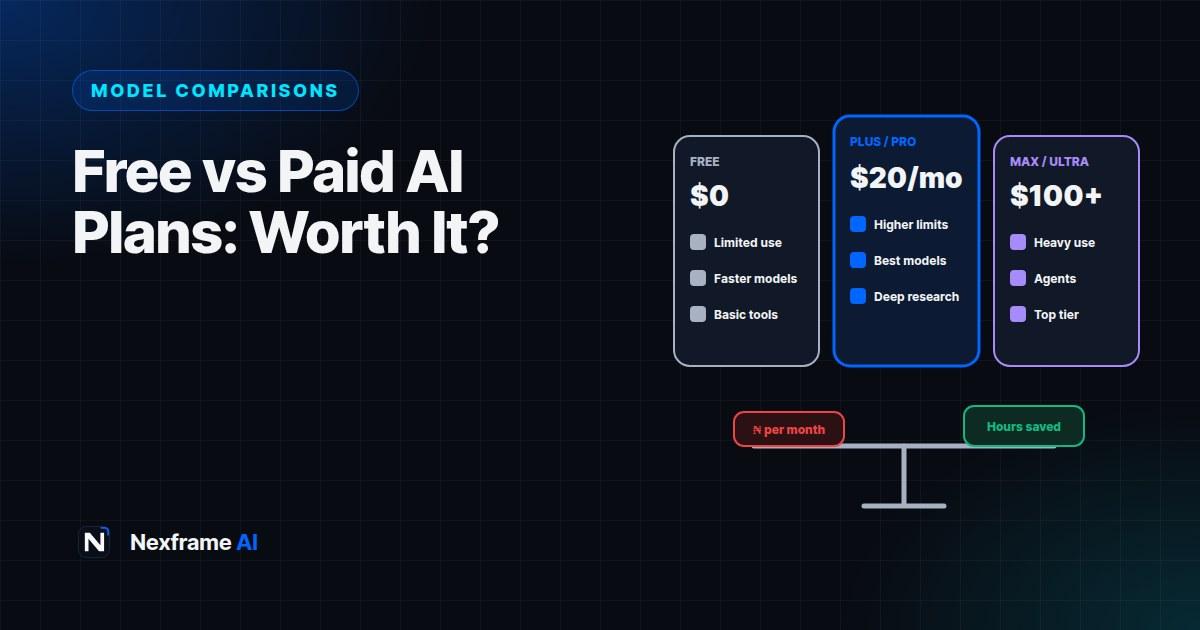
At around $20 a month, an AI subscription isn't small money, especially when you convert it to naira and add VAT. At the same time, people you know swear their paid plan saves them hours every week. So is it worth paying, and if so, for which one?
The honest answer is: for many people, the free plans are enough. For others, especially people who use AI daily for work, a single paid plan pays for itself quickly. The trick is knowing which group you're in, and not paying for more than you need.
This guide compares free vs paid AI plans for ChatGPT, Claude and Gemini in 2026: what you get for free, what paid plans add, the cheaper tiers in between, what it really costs from Nigeria, and a simple way to decide.
Prices and features change often. Figures here were checked in October 2026; always confirm on each provider's pricing page before subscribing.
What You Get for Free
All three major assistants offer capable free plans.
ChatGPT Free. Access to OpenAI's models with usage limits, plus features like web search, file uploads, image generation and Study Mode, with tighter limits than paid plans. When you hit limits, you're often switched to a lighter model for a while.
Claude Free. Access to Claude's models with daily usage limits, which can feel tight during long sessions. Good writing and analysis quality, with file uploads and projects on some plans.
Gemini (free). Google's free Gemini app, plus Gemini Notebook, Guided Learning and some Gemini features in Google apps. Free access to Google's faster models, with limited use of the most capable ones.
For occasional use, such as a few questions a day, help with an email or studying a topic, free plans are genuinely good. Our guide to the best free AI tools for students shows how to build a strong free toolkit, and our guide to the hidden costs of free AI tools explains what you may be trading away on free plans.
What Paid Plans Add
The main paid plans all cost about $20 a month in the US: ChatGPT Plus, Claude Pro and Google AI Pro. Claude Pro is a little cheaper if you pay yearly.
What you typically get:
Much higher usage limits. The biggest difference for heavy users. You can work for hours without hitting walls.
The most capable models. Better reasoning, writing and coding, especially on hard tasks.
Longer context. Work with long documents, big codebases and many files at once.
Advanced features. Such as deeper research tools, agent features, more image and video generation, coding tools and voice.
Integrations and storage. Google AI Pro, for example, includes Gemini in Gmail and Docs and extra Google storage. Claude Pro includes Claude Code, and ChatGPT plans include Codex for coding.
The Cheaper Tiers
There are now options between free and $20:
ChatGPT Go. A low-cost plan, around $8 a month in the US, with higher limits than free and access to more features. Availability and prices vary by country.
Google AI Plus. A budget Google plan, typically a few dollars a month depending on country, with more Gemini access and some storage.
Student offers. Google has offered eligible students a free year of a paid plan, and other providers run student promotions from time to time. Check each provider's official student page for current offers, and see our guide to the best free AI tools for students.
For light-to-moderate users, these middle tiers can be the sweet spot.
The Expensive Tiers
At the top, ChatGPT Pro, Claude Max and Google AI Ultra cost from around $100 to $200 or more a month. They're built for professionals who use AI intensively all day, such as developers running coding agents for hours, researchers and power users. Most people don't need them. Upgrade only if you regularly hit the limits of a $20 plan on work that earns you money.
What It Really Costs From Nigeria
If you pay in dollars from Nigeria, the true cost depends on:
The exchange rate. At around ₦1,330 to the dollar in October 2026, a $20 plan is roughly ₦26,600 a month before other charges.
VAT and fees. Nigeria charges 7.5% VAT on many digital services, and some banks add card fees or use less favourable rates.
How you pay. Some Nigerian cards have limits on international payments. Paying through app stores may show prices in naira, sometimes higher than the web price. Compare before subscribing.
In practice, a $20 plan often costs somewhere around ₦28,000 to ₦30,000 a month, depending on your card and the rate on the day. That makes choosing the right single plan more important than ever.
How to Decide: Four Questions
1. How often do you hit the free limits?
Use the free plans seriously for two weeks. If you rarely hit limits, stay free. If you hit them several times a week during important work, consider paying.
2. Does AI save you time on paid work?
Estimate how many hours a month AI saves you on work that earns money. If one paid plan saves even two or three hours a month for a freelancer, business owner or professional, it usually pays for itself.
3. Which tool fits your main tasks?
Pick the plan that's strongest for what you do most: writing, coding, research, Google apps or general use. Our guide to the best AI for writing and our GPT-5 vs Claude vs Gemini decision guide can help.
4. Do you need the extras?
Storage, Google app integration, coding agents, image or video generation, or deep research tools can tip the decision towards one plan.
Common Profiles and What Usually Makes Sense
Students. Free plans plus any student offers. Use AI tutor modes and Gemini Notebook. Pay only if you have specific heavy needs, such as a final year project that involves a lot of coding.
Job seekers. Free plans are usually enough for CVs, cover letters and interview practice, especially combined with tools like Nexframe Resume.
Content creators and freelancers. One paid plan often pays for itself through time saved on writing, scripting and ideas. Choose the one that best fits your main content type.
Small business owners. One paid plan for the owner, plus free plans for occasional staff use, often works well. Consider business plans if you need admin controls and data protections. Our guide to writing an AI policy for your small business covers which tools to approve.
Developers. A paid plan with a strong coding agent is usually worth it. Our guide to choosing an AI coding agent compares options.
Casual users. Stay free. The free plans are better than paid plans were a couple of years ago.
Get More From Free Plans
Before paying, make sure you're getting the most from free:
Use different assistants for different tasks to spread out usage limits.
Write better prompts so you need fewer messages. The free AI Prompt Improver helps.
Use specialised free tools, such as Gemini Notebook for studying and research.
Learn the hidden features. Our guide to hidden ChatGPT features covers many that work on the free plan.
A Worked Example: Deciding Whether to Pay
Chiamaka is a marketing executive who also runs a small side business selling skincare online. She uses AI daily for campaign copy, product descriptions and reports.
Two-week free test: She hits ChatGPT's and Claude's free limits most afternoons, usually in the middle of important work.
Time saved: She estimates AI saves her around six hours a month on her side business alone.
Fit: Most of her work is writing and editing, and her company uses Microsoft, not Google apps.
Decision: She subscribes to one $20 plan, chosen for writing quality, and keeps using the free plans of the others for second opinions and image generation.
Review: After three months, she checks whether she's still using it daily. She is, and the time saved on her business more than covers the cost.
Avoid Subscription Creep
AI subscriptions add up quickly. A few habits help:
Keep one main paid plan unless you have a clear, profitable reason for more.
Review every three months. Cancel if you're not using it regularly.
Set reminders before free trials end.
Be wary of reseller offers. Cheap "shared accounts" or unofficial subscriptions often break terms of service and can be scams. Pay only through official channels. Our guide to AI voice cloning scams covers broader scam warning signs.
Common Mistakes to Avoid
Paying before testing free plans. Test seriously first.
Paying for several similar plans. One is usually enough.
Buying top tiers "just in case". Upgrade only when you hit real limits.
Ignoring the true naira cost. Factor in exchange rates, VAT and card fees.
Forgetting to cancel. Review your subscriptions regularly.
Which Paid Plan Fits Which Need?
If you've decided to pay, the next question is which plan. These are general guides; test the free versions first to confirm.
If you mostly write or edit: Many writers prefer Claude Pro for natural prose and long documents, while ChatGPT Plus suits writers who also want images, voice and a wide range of tools. Our guide to the best AI for writing includes a 20-minute test.
If you code: Look at which plan includes the coding agent you prefer. Claude Pro includes Claude Code, and ChatGPT plans include Codex. GitHub Copilot is another low-cost option focused only on coding.
If you live in Google apps: Google AI Pro brings Gemini into Gmail, Docs and Drive, adds extra storage and raises limits in Gemini Notebook.
If you create images and video: ChatGPT Plus and Google AI Pro both include image generation and some video features. Our guide to AI image generators compared covers the options.
If you do a lot of research: Compare the deep research features in each plan, and consider whether a dedicated research tool fits better. Our guide to Perplexity vs Google Search explains the differences.
If you're not sure: Start with the cheaper tier, such as ChatGPT Go or Google AI Plus, for a month and see whether it removes your main frustrations.
Questions to Ask Before You Subscribe
Run through these before you pay:
What specific problem will this solve? For example, "I hit limits during client work" or "I need longer documents".
How often will I use it? Daily use justifies a subscription; weekly use rarely does.
Is there a cheaper tier or student offer? Check before paying full price.
What will it actually cost me in naira? Include VAT and card fees.
Can I pay safely through official channels? Avoid resellers.
When will I review it? Put a reminder in your calendar for three months' time.
If you can answer these clearly, you'll make a confident decision, and you won't end up paying for a subscription you barely use.
Remember too that switching is easy. Most plans are monthly, so if a different tool becomes better for your work, you can cancel one and try another. Keep your important prompts, style guides and project notes saved outside any single tool, so moving is painless. Our guide to building an AI second brain shows how.
Final Thoughts
Free vs paid AI plans isn't about which is better in general; it's about what you need. Free plans are excellent for occasional and learning use. One well-chosen paid plan is worth it for people who use AI daily on work that matters, especially when it saves paid hours.
Test the free plans for two weeks, measure how often you hit limits and how much time AI saves you, then pay for one plan that fits your main work. Review it every few months.
For more comparisons, see our guides to AI image generators and AI voice assistants.
Frequently Asked Questions
Is ChatGPT Plus worth it?
It's worth it if you use ChatGPT daily, regularly hit free limits and benefit from its extra features. For occasional use, the free plan or a cheaper tier is often enough.
Is Claude Pro better value than ChatGPT Plus?
They cost about the same. Claude Pro is often preferred for writing, long documents and coding with Claude Code; ChatGPT Plus for breadth of features. Choose by your main tasks.
Is Google AI Pro worth it?
It's good value if you use Gmail, Docs and Google Drive heavily, want extra storage or use Gemini Notebook a lot.
How much does a $20 AI plan cost in naira?
Roughly ₦26,600 at around ₦1,330 to the dollar in October 2026, plus VAT and possible card fees, so often around ₦28,000 to ₦30,000 a month.
Can I use AI for free?
Yes. ChatGPT, Claude and Gemini all have capable free plans, with usage limits.
Should I pay for more than one AI subscription?
Usually not. One paid plan plus the free versions of others covers most needs.
What are ChatGPT Go and Google AI Plus?
Cheaper tiers between free and the $20 plans, with higher limits than free. Availability and prices vary by country.
Are shared or cheap reseller AI accounts safe?
Often not. They may break terms of service, get cancelled without refund or be outright scams. Pay through official channels only.
Comments (0)
Sign in to post a comment.
- Be the first to comment.